The Strategy
A Programmatic Approach to SEO
To achieve our primary goal of increasing the company’s online visibility, we had to create and execute a long-term SEO strategy. One that would allow the website to rank for thousands of relevant keywords without manual optimisation: Programmatic SEO.
What is programmatic SEO?
Also known as pSEO, programmatic SEO uses automation to create landing pages at scale. The primary aim is still the same as in traditional SEO – build pages that rank within Google’s search result pages and target unique keywords.
The difference is that programmatic SEO follows a uniform template created through automated tools and a database.
Why did we take this approach? Programmatic SEO has several advantages, the most obvious one being increased efficiency by automating page creation. However, pSEO also:
- scales easily to target multiple keywords,
- saves time for strategic tasks,
- helps sites rank for low-competition keywords,
- boosts backlink potential,
- and is cost-effective over time.
A programmatic approach to SEO isn’t without its potential set of risks you need to consider before using it in your SEO strategy.
For instance, its lack of personalisation might affect user experience. It also requires programming skills to set up a template and also depends heavily on data quality and accuracy.
How Programmatic SEO Works
Programmatic SEO can provide outstanding results. Implementing it, however, requires a systematic and careful approach. Here are the usual steps to follow when creating content through programmatic SEO:
- Find Scalable Keywords: Begin by identifying a broad, scalable keyword related to your content goals, such as “best pasta recipes” for a culinary website. Use tools like Ahrefs’ Keywords Explorer to find variations and related keywords that can be grouped together.
- Identify Modifiers: Break down your keywords into head terms (main category) and modifiers (specific descriptors) to form long-tail keywords. For example, in the phrase “best vegan recipes for beginners, “best vegan recipes” is the head term, while “for beginners” serves as a modifier.
Combining these two steps, you can create a large list of keywords like “best X recipes for Y”, where “X” is a cuisine or type of food (i.e. chinese, indian, dessert, breakfast) and “Y” is a type of user (i.e. beginner, vegan etc)
- Determine Search Intent: Study the top-ranking pages for each target keyword to identify the type of content users expect to see. For example, if the top results include detailed recipes with images and videos, prioritise similar formats for your content.
- Gather Relevant Data: Use a mix of private data (unique insights or customer data) and public data (such as government databases or datasets on Kaggle) to add value to your content. Private data makes your content stand out, while public data is a faster but less unique option.
- Build a Template: Develop a flexible template for your landing pages with placeholders for keywords and data. For example, using a simple spreadsheet with formulas can help dynamically populate each page with unique information.
- Optimise Metadata: Ensure all metadata – such as URLs, titles, headings, and meta descriptions – are tailored to your target keywords. Concise URLs and engaging titles attract users, while optimised H1s and meta descriptions improve visibility and click-through rates.
Publishing Content on a Subdomain
Subdomains are sections of a website that operate under a separate URL from the main domain (e.g., blog.example.com vs. example.com). They’re often considered sub-optimal for SEO because search engines treat subdomains as separate entities, potentially diluting domain authority and search ranking power across multiple URLs.
However, while using a single domain is typically more beneficial for SEO, changing your URLs frequently can be more harmful than maintaining a consistent subdomain structure. In this case, choosing a solution that can be maintained long-term was crucial, as frequent URL changes disrupt SEO efforts and user experience.
When are Subdomains Useful?
Using subdomains is a good idea when the content on the subdomain is distinct from the main site or when a different tech stack is needed to support long-term scalability.
For example, if the subdomain hosts a significantly different type of content or requires unique functionality, using a subdomain can help manage these technical needs effectively.
Implementation of Canonical Tags
Canonical tags are HTML elements that help prevent duplicate content issues. They signal to search engines which version of a page is the preferred or canonical version.
Canonicals are placed in <head> section of a page. They are essential for SEO, consolidating link equity (ranking power) to a single URL, and preventing dilution across duplicate or similar pages.
Here’s an example of a canonical tag:
<link rel=”canonical” href=”https://yourwebiste.com/” />
The URL specified is the primary version of the page you want indexed. Without canonical tags, search engines might index multiple versions of a page, which can confuse algorithms and negatively impact search rankings.
The Issue
Before we started working on their website, the company always linked to the most recent versions of their packages and services.
URLs without version control always redirected the user to the most recent version, making it impossible to index a non-versioned page. The issue here was that each new package version required changing the URL Google ranked in its index.
In addition, the other versions of the page were canonicalised to the non-versioned page, even when it was a 301 redirect. To manage this, we made those pages self-referential. That meant all the different versions of the package could be indexed, not just one version.
This approach made sense because developers often use different package versions and want to know the vulnerabilities of each package.
The Solution
We removed the redirect and allowed search engines to index the non-versioned page, as well as all old versions of a package.
How to Implement Canonical Tags Correctly
Here’s a quick overview of the best practices to follow when implementing canonical tags:
- Use Self-Referencing Canonicals: Ensure each page includes a canonical tag pointing to its own unique URL.
- Select the Canonical URL: Choose the most authoritative and representative URL as the preferred version; this way, you’ll consolidate your link equity and avoid indexing variations.
- Use Absolute URLs: Instead of relative paths, specify canonical ones with absolute paths. This will ensure accuracy and prevent potential canonicalisation issues.
- For example, use <link rel=”canonical” href=”https://www.example.com/page” /> instead of <link rel=”canonical” href=”/page” />
- Prevent Canonical Chains: Avoid canonical chains. To prevent them from occurring, ensure each canonical tag points directly to the preferred URL and not through intermediary pages.
- Canonicalise Pagination: Implement canonical tags on paginated content to consolidate link equity and prevent duplicate content-related issues across pagination pages.
Becoming a Thought Leader
One key aspect of our strategy was establishing and strengthening the client’s role as a thought leader within the industry building brand awareness. We began with rebranding the main product and earning organic backlinks through white papers.
Rebranding the Product
As stated at the beginning, while most users within the niche knew the company’s branded tool, they didn’t associate it with their name. To change it, we decided to rebrand the main product by adding the company’s name to the product’s title.
This change included page titles, headings, internal links, and URLs. Basically, anything that previously was just the product name became their brand + product name. The risk was the loss of existing keywords.
The (long-term) benefit? People now knew the brand behind the product.
This was a strategic choice to strengthen brand recognition. Just as brands like Nike, Adidas, and New Balance differentiate themselves within the sneaker market, our client aims to stand out by attaching its brand to its product.
Strong branding builds trust, improves recall, and influences customer preference.
Leveraging the Risks vs Benefits of Rebranding
Benefits: Enhanced brand visibility, stronger market positioning, and improved brand association with the product. Customers and industry professionals recognise the company behind the product, enhancing credibility.
Risks: Loss of search rankings for low-priority keywords and potential disruption of SEO performance. Rebranding can sometimes cause temporary drops in traffic, especially if not implemented carefully.
How to Rebrand for SEO
Rebranding can have a great outcome on SEO performance on the condition that it’s done carefully and correctly. Here are some of the best tips to follow when rebranding for search engines:
- Page titles: Update titles to reflect the new brand and product name, ensuring consistency.
- Headings: Revise all headings (H1, H2, etc.) to align with the rebranded name.
- Internal links: Update internal links to reflect the new brand terminology.
- URL changes: Change URLs to incorporate the updated brand name, if necessary.
- Redirects: Implement 301 redirects from old URLs to new ones to preserve link equity.
Producing White Papers That Earned Organic Backlinks
A white paper is an in-depth, authoritative report that provides valuable insights on a specific topic or industry trend. white papers are research-based, highly informative, and often used to guide decision-making.
How can they benefit the SEO? Publishing white papers establishes the brand as the industry’s leading source of information. The white paper gains authority and visibility as a valuable source, attracting organic backlinks from reputable sites.
How to Write SEO-Optimised White Papers
Due to their authoritative nature, white papers require much more attention than your standard 800-word blog post. Here’s how to ensure your white paper drives high-quality links, improving your site’s SEO performance and online authority:
- Research unique data: Provide unique insights or data that are valuable to the industry.
- Use relevant keywords: Strategically incorporate keywords without compromising readability.
- Add value: Offer actionable insights or innovative perspectives on a topic.
- Visuals and formatting: Use charts, graphs, and a clean layout to improve readability and shareability.
How White Papers Earned us Backlinks
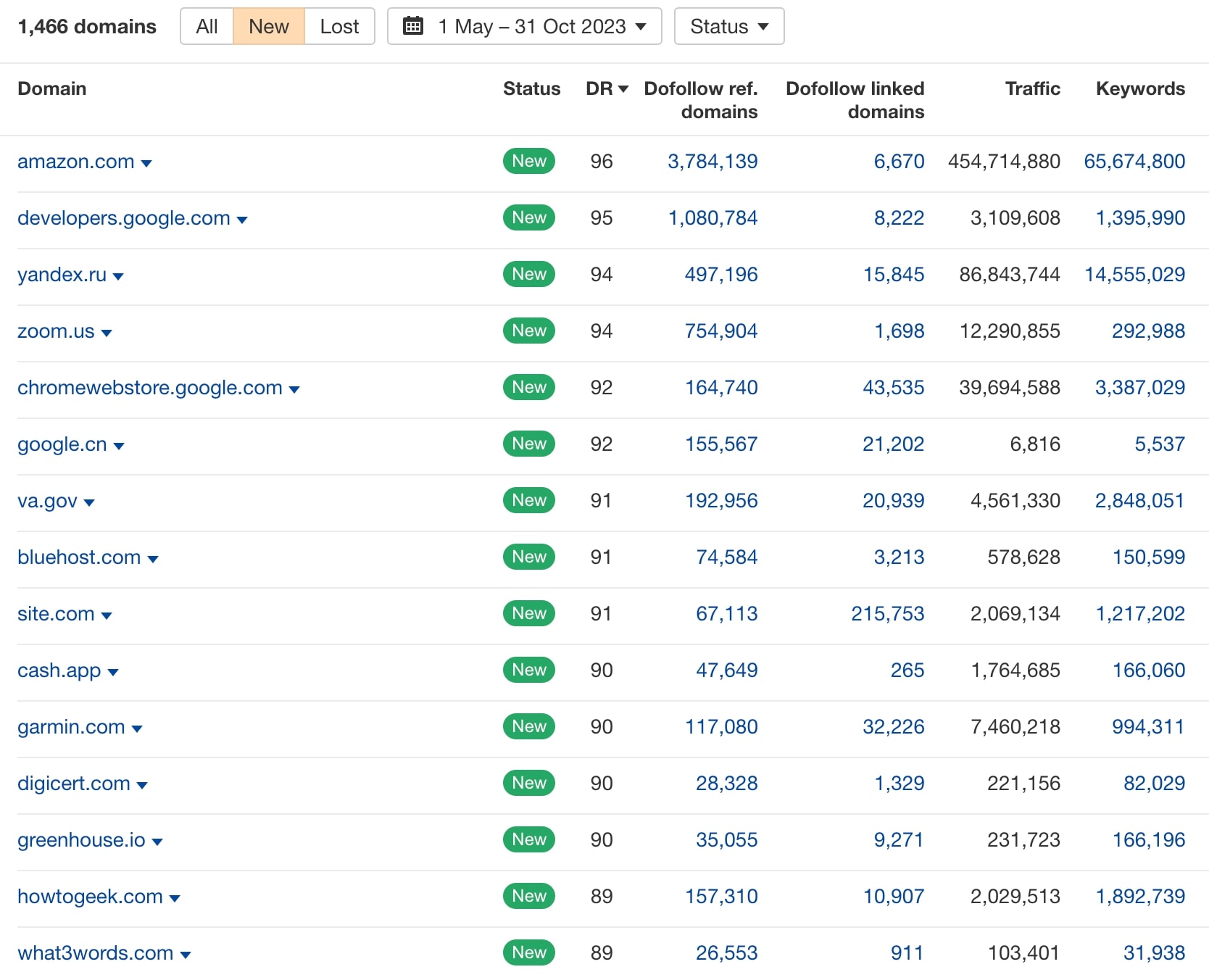
By creating high-quality, well-researched white papers, we helped the company attract organic backlinks from high-authority sites such as Google, Business Insider, Microsoft, and more.
These earned links boosted the site’s Domain Rating (DR), positioning the company competitively within its industry and establishing its status as the thought leader.
What are Earned Backlinks?
Earned backlinks are links obtained organically when other websites find value in your content and link to it without payment or outreach. Unlike paid links, earned backlinks grow naturally with the increasing content’s reputation and visibility. They are also more sustainable and credible, as each backlink reinforces the brand’s authority within the niche.
Producing Educational Content
Rebranding and creating white papers allowed us to get the industry’s attention, build awareness and strengthen the website’s backlink profile.
Crafting educational content was another critical step toward establishing the company’s authority in the niche.
This played a crucial role in our strategy, as there were limited opportunities to target keywords with clear commercial or transactional intent.
By focusing on education, we aimed to provide valuable insights to users at various stages, building trust and authority in the industry. Educational content not only addressed immediate user needs but also expanded market awareness, helping more companies understand the industry, products, and legislation changes.
Writing Educational Content
When crafting the content, we leveraged multiple types of content for different forms of education. We took a big-picture view of the industry, user needs, and their challenges, which allowed us to open up to more opportunities.
We divided our content strategy into three areas – education about the product, industry, and legislation changes:
Product Education
We took a comprehensive approach to product-related content, offering resources for users with diverse needs. Product and solution pages addressed those researching purchase options, while documentation pages and community forums supported those using or exploring the product.
This variety of resources made the product more accessible and removed learning barriers, creating a seamless user experience.
Industry Education
To establish thought leadership, we created content that addressed broader industry trends and challenges. With blog articles, white papers, and a “state of the industry” report, we provided insights on security, emerging risks, and new technologies.
This content attracted backlinks from authoritative sources like Microsoft, Intel, and government entities, reinforcing the brand’s position at the forefront of the industry.
Legislation Education
Anticipating industry shifts, we also focused on educating companies about upcoming legislative changes and their impact on the tech sector.
Through blog articles and white papers, we helped companies understand new compliance requirements, broadening the audience and encouraging more companies to engage with the market.