The Strategy
Raising the awareness of our client’s brand and making it easily searchable for potential customers was particularly challenging due to the current state of their industry. This major obstacle guided the process of devising our content strategy.
The success of our campaign proves that new brands can achieve SEO success even in the most competitive niches, or ones that have long been dominated by industry giants. If you find yourself in a similar situation with your business, taking the elements of our process and applying them to your unique circumstances can be of tremendous help.
Growing Keyword Visibility for Informational Keywords
With little chances of competing for commercial and transactional keywords, we focused on informational queries to raise our client’s keyword visibility. The end goal here was to produce content that revolves around questions related to smoking, quitting the habit, and viable tobacco alternatives.
To achieve that, we needed to identify the popular question-based keywords and design a content plan for them. If you’re struggling with finding these types of key phrases for your own website, there are a number of tools out there that will make this task a whole lot easier.
Some of these are more complicated than others, but two common ones include: Ahrefs Keywords Explorer, and the People Also Ask section in Google’s search results.
Ahrefs Keywords Explorer
The Keywords Explorer tool by Ahrefs allows you to identify question-based, informative terms. Follow the steps below to get started.
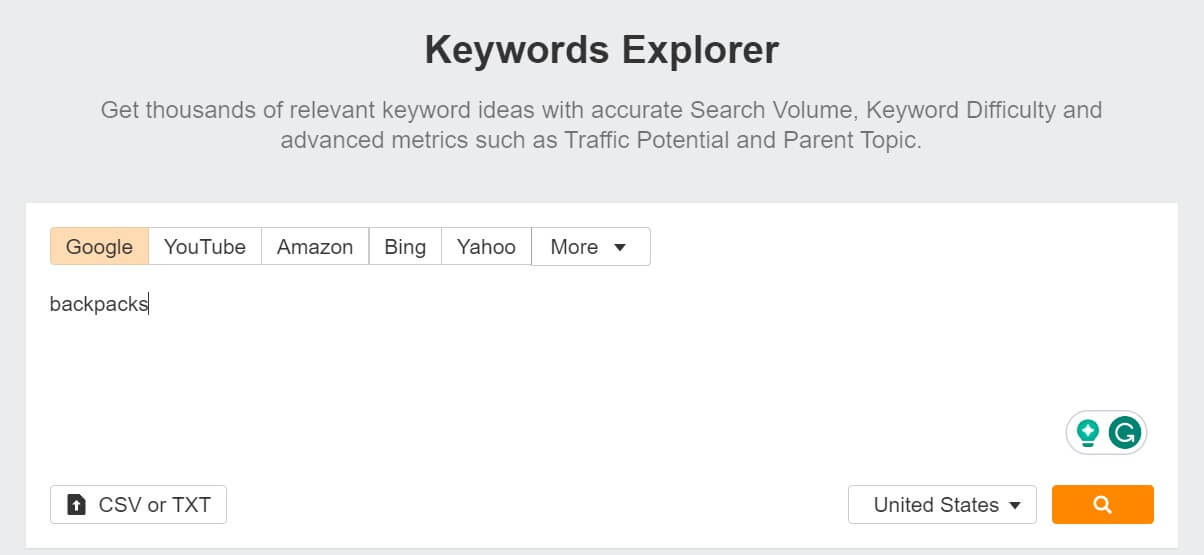
- Open up the Keywords Explorer and type in a broad seed keyword that relates to your business. Select the country you want to focus on, as well. Here, we used “backpacks,” and targeted the USA:
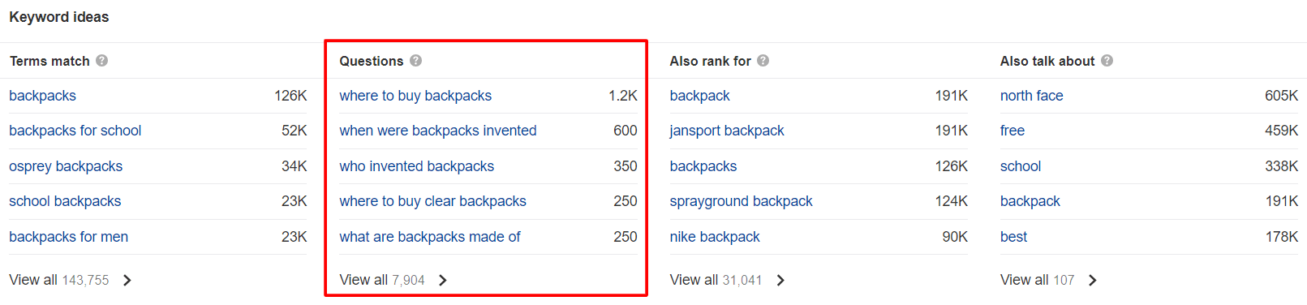
- Scroll down to “Keywords Ideas,” and click on “View all” under “Questions,” like so:
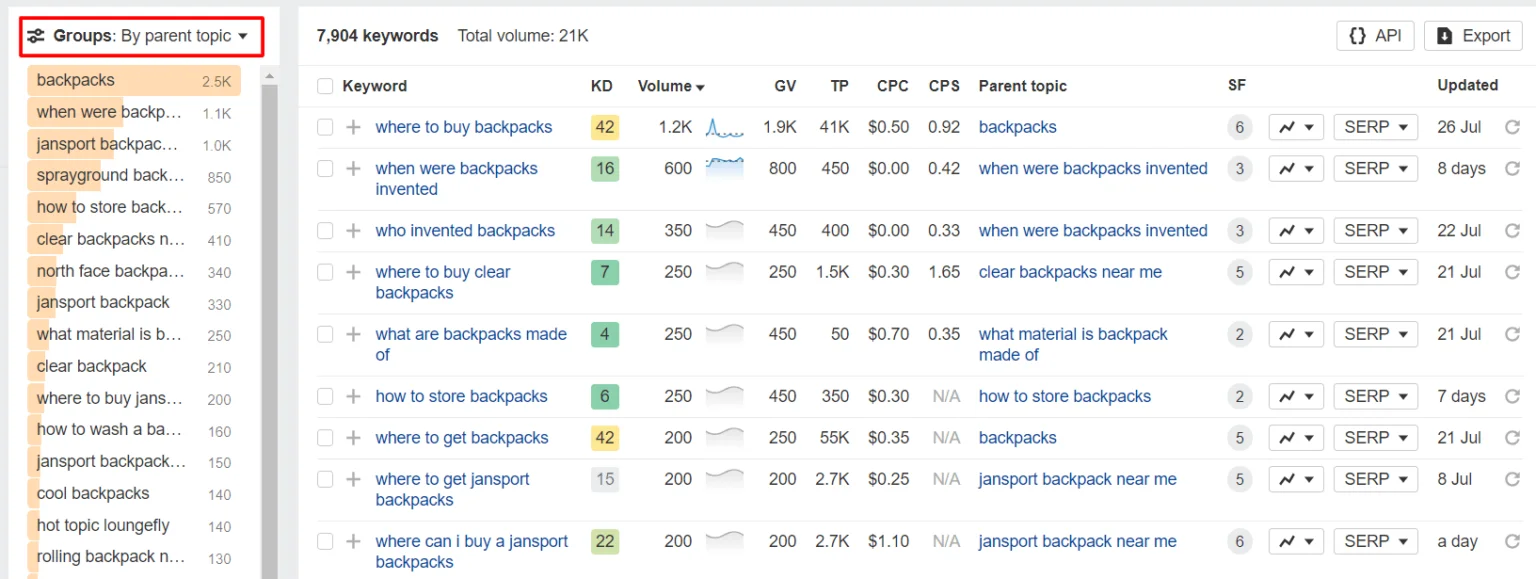
- Then, filter your results to group them by the Parent Topic. Doing this will make it easier to create your content plan as you’ll have all the similar terms pooled together.
- Choose one of the parent topics and click on it. This will take you to a list of all the relevant question-based keywords. In the screenshot below, you can see that the parent topic “when were backpacks invented” has a 1.1K search volume with 6 relevant keywords.
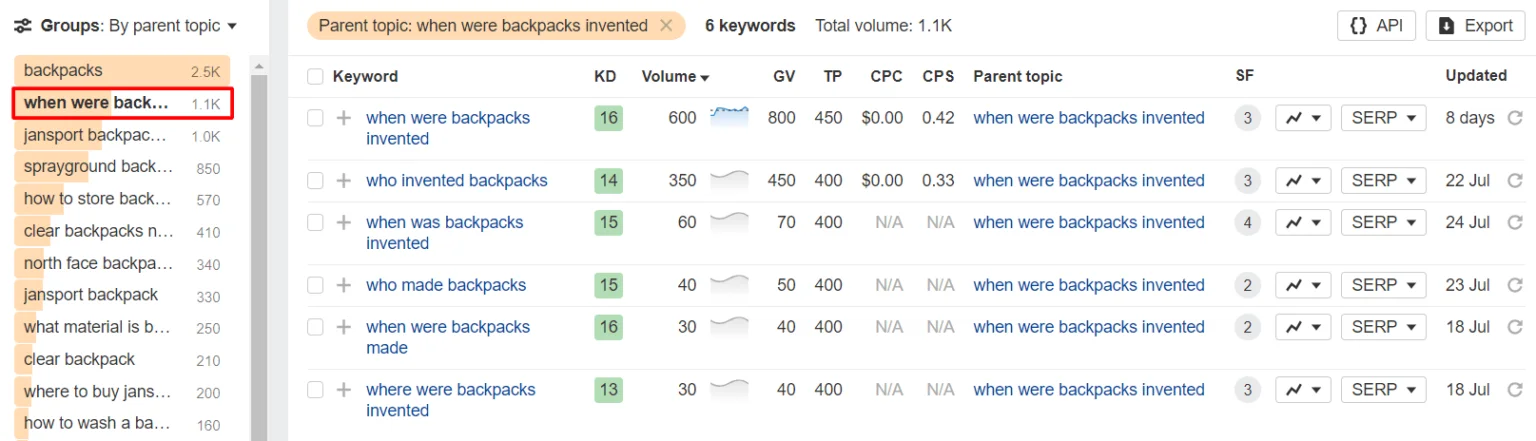
- With this knowledge, you can easily plan out and write an optimised blog post on the invention of backpacks.
People Also Ask
If you don’t want to pay for Ahrefs or just need to generate a few simple ideas for new, relevant blog content, you can’t go wrong with People Also Ask. It’s the section of Google search results that shows questions related to the query you just typed in. Here’s how to best take advantage of it:
- Enter a seed keyword that’s related to your niche. We’ll stick with “backpacks.”
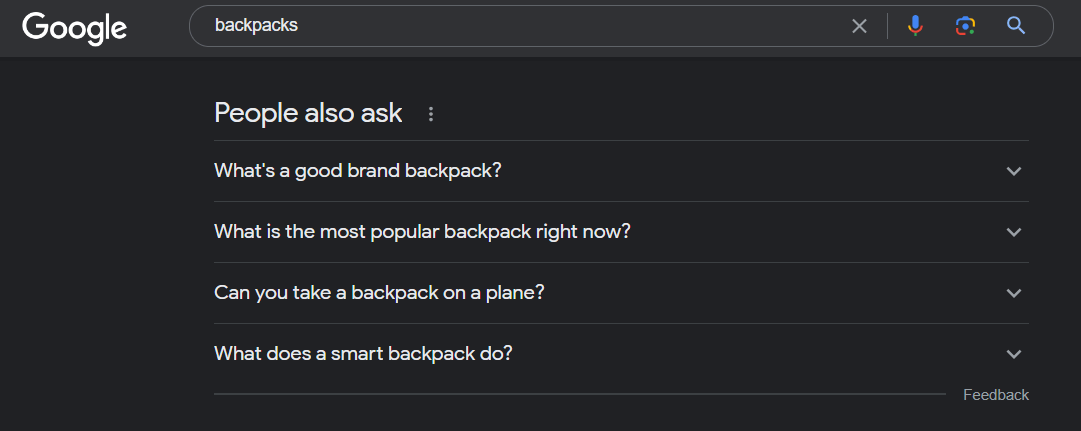
- Choose a question you like and expand it. It’ll show you the top ranking result and bring up even more questions. As you can see in the screenshot, we expanded “Can you take a backpack on a plane,” revealing more questions like: “Can I bring 2 backpacks on a plane?”
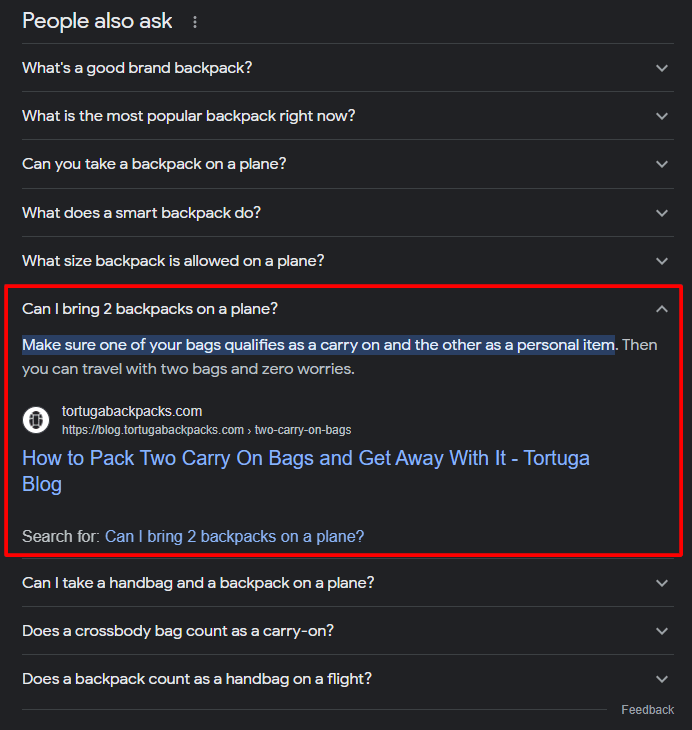
- Repeat this process however many times you want to unveil even more questions. It’s an easy way to identify the kind of information you need to include in your posts and churn out loads of relevant, searchable blog content ideas.
How to Write Content for Informational Keywords
Now that you have a blueprint for your new, informational blog content, you can get to writing your first informational blog post. Here are some important tips to keep in mind:
- Research your competition: look over the top-ranking pages for your target query and see how they approached the subject. It will give you a good idea of how to write and structure your article to rank better.
- Clearly answer the key questions: Be as direct and concise as possible to increase your chances of getting into the featured snippet results.
- Show that you’re an expert: present yourself as a trustworthy authority within your niche. Do so by using external links to other respected, authoritative websites, having a detailed author bio with a headshot and credentials, and including a bibliography section.
- Use internal links: by directing readers to your product or service pages, you can use your informative blog content to drive conversions.
Improving UX on the Blog
Having the right content is absolutely critical, but so is making sure that your blog is functional, easily navigable, and makes it easy for readers to keep finding more relevant information pertaining to the subject they’re interested in.
Below, we’ll take you through some fixes that we implemented on the client’s site, that you can also replicate to improve the user experience on your blog.
Add a “Related Posts” Section
Each article you publish should have a “Related Posts” section appearing at the end. This keeps readers on your website for longer, get more views, and more. Here’s what a typical “Related Posts” section looks like:
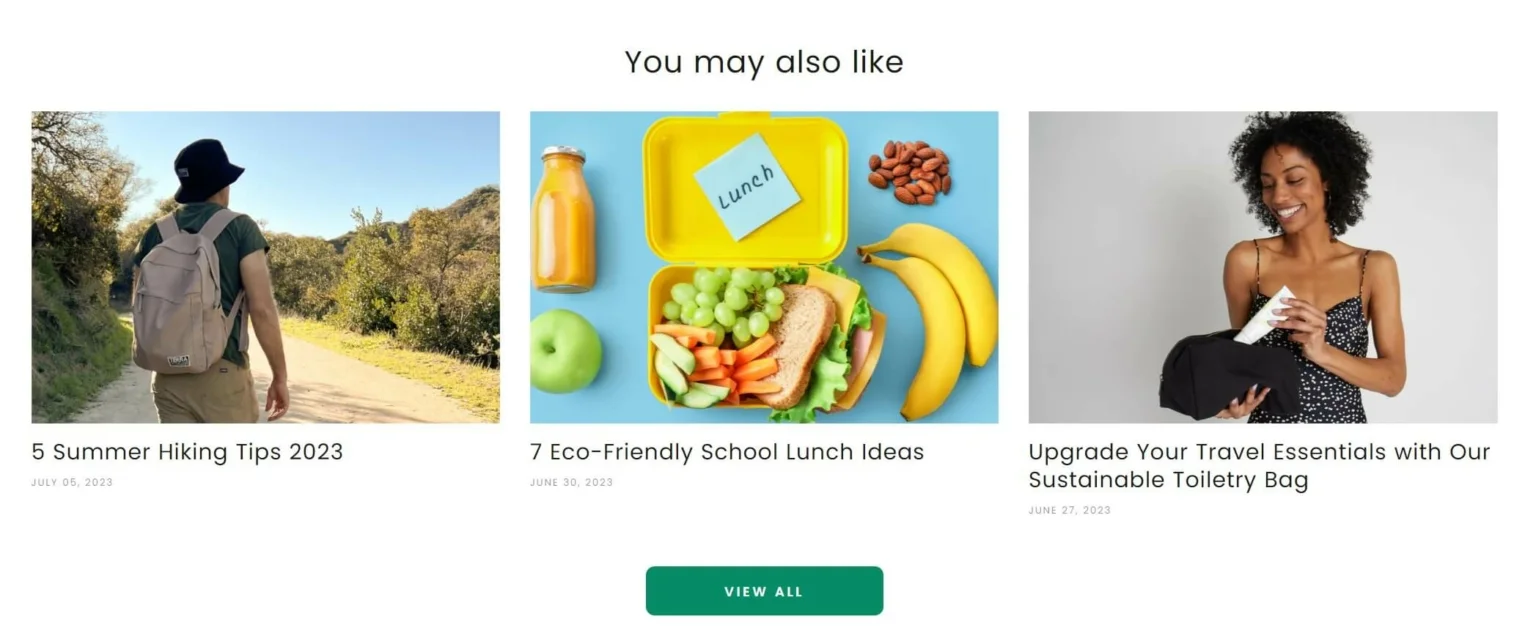
Using “Related Posts” on your blog comes with plenty of benefits, such as:
- Bounce rate reduction
- Increased page views
- Better content discoverability
- Improved chances of getting shared on social media
- More time spent on your site
There are tools such as the free WordPress plugin Contextual Related Posts that will scrape your blog for relevant posts based on the article’s content, and then automatically add them to “Relevant Posts.” However, we recommend reviewing these suggestions to make sure that they are indeed relevant.
Use Your Sidebar Wisely
Adding sidebar content next to your blog posts is a great way to wisely use all of the space that’s available to you. By taking advantage of the sidebar, you can drive conversions, help users reach out to you, enable social media sharing, and more.
Here are just a few examples of great sidebar content:
- Downloads
- Contact buttons
- Sign-up forms
- Social media buttons
- Search bars
- Related article links
- Product page links
- Author bios
- Customer testimonials
A well-structured sidebar will let your blog posts go beyond their informational purpose and provide your readers with more ways to engage with your website.
Internal Linking
Both the sidebar and “Related Posts” are great tools for incorporating more internal links into your blog, but you shouldn’t overlook including relevant links in the article’s text itself. They’re a great way to sneak in links to your product or service pages in a natural way, without steering away from the subject of your article.
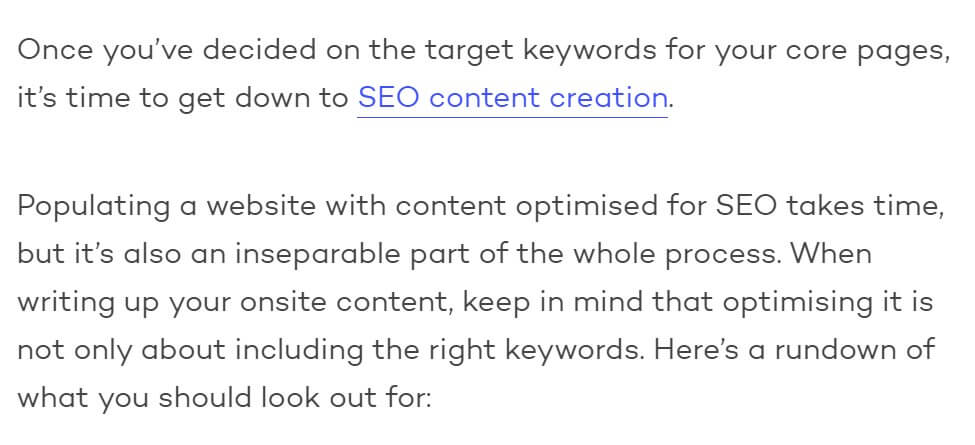
Hyperlinks directing readers to a number of different pages on your website will improve website navigation for both users and search engine crawlers. Strategically placed internal links are very effective in getting visitors to engage with your website’s core pages, increasing the potential for conversions.
When adding internal links to your blog content, keep the following best practices in mind:
- Use descriptive, relevant anchor text
- Link to relevant pages
- Avoid excessive internal linking
- Link back to each new blog article in existing pages
- Place your links strategically, so that they make sense within the context of your blog post
Link-Building Strategy
Without any substantial online presence and no search volume for their products, our client’s site was lacking domain authority. This is why we resorted to acquiring PR links to get the best possible backlinks that would have a real, positive impact on our client’s reputation and recognizability.
Digital PR is all about reaching out to well-established influencers, online media outlets, and journalists to build relationships with them and get your brand mentioned on their sites. PR links are valuable in building up a site’s authority, as they originate from reputable, recognisable experts in the niche, rather than a simple blog or content aggregation site.
Building PR links differs significantly from traditional backlink outreach efforts. Here are some tips to help you get started with your own Digital PR campaign:
- Identify your targets: know exactly who you want to target. Try looking for publications or profiles frequently visited by your customer base, outlets people go to for breaking news in your niche, as well as niche-specific influencers with large social media followings.
- Carry out extensive research: once you’ve narrowed down your search, look into these publications, their authority, following, and engagement rates. Use a tool like Prowly to find the best journalists and publishers to contact.
- Create content that caters to authoritative outlets/individuals: focus on producing content that your PR targets would be likely to share. Generic blog posts will not be effective here. The content needs to be interesting, unique, and bring something new to the table. Think something along the lines of case studies, industry reports, expert interviews, and well-crafted, newsworthy stories.
You can find out more about our link-building services here.
Image Optimisation
Images are a crucial part of any website, but especially online stores.
Images on eCommerce websites need to be of a high quality to showcase your products in fine detail. However, high-resolution pictures have a large file size that can slow down your site’s loading times.
Optimising images to reduce their size and improve loading times can be achieved fairly easily. Here’s what we’ve done to help our client:
- Image compression: compressing pictures reduces their size while preserving good image quality. It’s a really simple process you can use to radically improve page performance for free, with the help of tools like TinyPNG or Imagify.
- Lazy-loading: this is a common SEO practice that keeps non-critical content, such as images, from loading up on the page until the viewer actually needs to interact with it. Essentially, this means that no images or videos will load up until the reader actually scrolls down to where they’re located on the page.This can greatly improve loading speeds by reducing data transfer between the web browser and host server.









![How to Sell GEO: The Agency Playbook [Webinar]](https://susodigital.com/wp-content/uploads/2026/10/Webinar-How-to-Sell-GEO-The-Agency-Playbook-920x920.webp)