The Strategy
Fixing Shopify Duplication
A common ecommerce SEO issue, specifically for Shopify websites, is internal duplication. The most common case of duplicate content is through the creation of a duplicate URL when a product is added to a category.
For example, you may have the original product URL that looks something like this:
- stationary.com/products/black-pen/
But when you add this product to a collection, Shopify will automatically generate a new URL (with identical content) that looks like this:
- stationary.com/collections/stationary/products/black-pen/
Importantly, the canonical tag (a tag used to help Google choose the preferred version of duplicate pages) on these pages points to the original product URL by default.
This is problematic as you’re first telling Google to crawl and index the collections/…/products/ URL, but the canonical tag points Google to the original URL which in turn leads to both duplicate pages being crawled and indexed.
To fix this issue, we changed a some of the code from the Shopify theme files:
- Select Online Store > Themes in the left sidebar.
- Select Actions > Edit Code
- Navigate to the Snippets folder and select product-grid-item.liquid
- Now, change the following line of code:
From: <a href=”{{ product.url | within: current_collection }}” class=”product-grid-item”>
To: <a href=”{{ product.url }}” class=”product-grid-item”>
Making this change will ensure that any reference to your product pages follow the correct URL path.
Relaunching the Blog to Target Long Tail Keywords
Regularly publishing supplementary blog content should be a vital component of any SEO content strategy. Our content team relaunched the client’s non-existent blog with bespoke content focused on topics related to gifts for various members of the family, festive holidays and more.
Doing so helped build the website’s keyword visibility by targeting long tail search terms whilst allowing us to leverage the power of internal linking by guiding visitors towards the client’s most important landing pages.
On-Page Optimisation for Product & Category Pages
The on-page elements (i.e. the page title, H1 heading etc) of important product and category pages were not properly optimised for the keywords that the client was targeting. Many of these pages also had duplicate page titles or missing headings which not only impact SEO performance, but also provide a poor user experience.
For each of our client’s core product and category pages, we ensured that the page title and H1 heading:
- Is engaging for readers
- Concisely describes the content on the page
- Includes the primary keyword(s) that you want to rank for
Find out more about how to optimise the on-page elements of your web pages here.
Building Domain Authority
Link building is one of the most powerful methods to improve a page’s rankability. At the start of the campaign, the client’s backlink profile was already seeing consistent growth, but many of the most important product and category pages had zero backlinks pointing towards them.
To identify the pages on your website that have the least amount of backlinks, enter your domain into Ahrefs’ Site Explorer and navigate to the Best by links report.
Sort by Referring domains (the number of websites that link to the respective pages) and filter so that you only view pages that return a 200 HTTP status code.
You can also see results for specific pages of importance. In the example below, the report is displaying data for all URLs that contain “/paper-products/”.
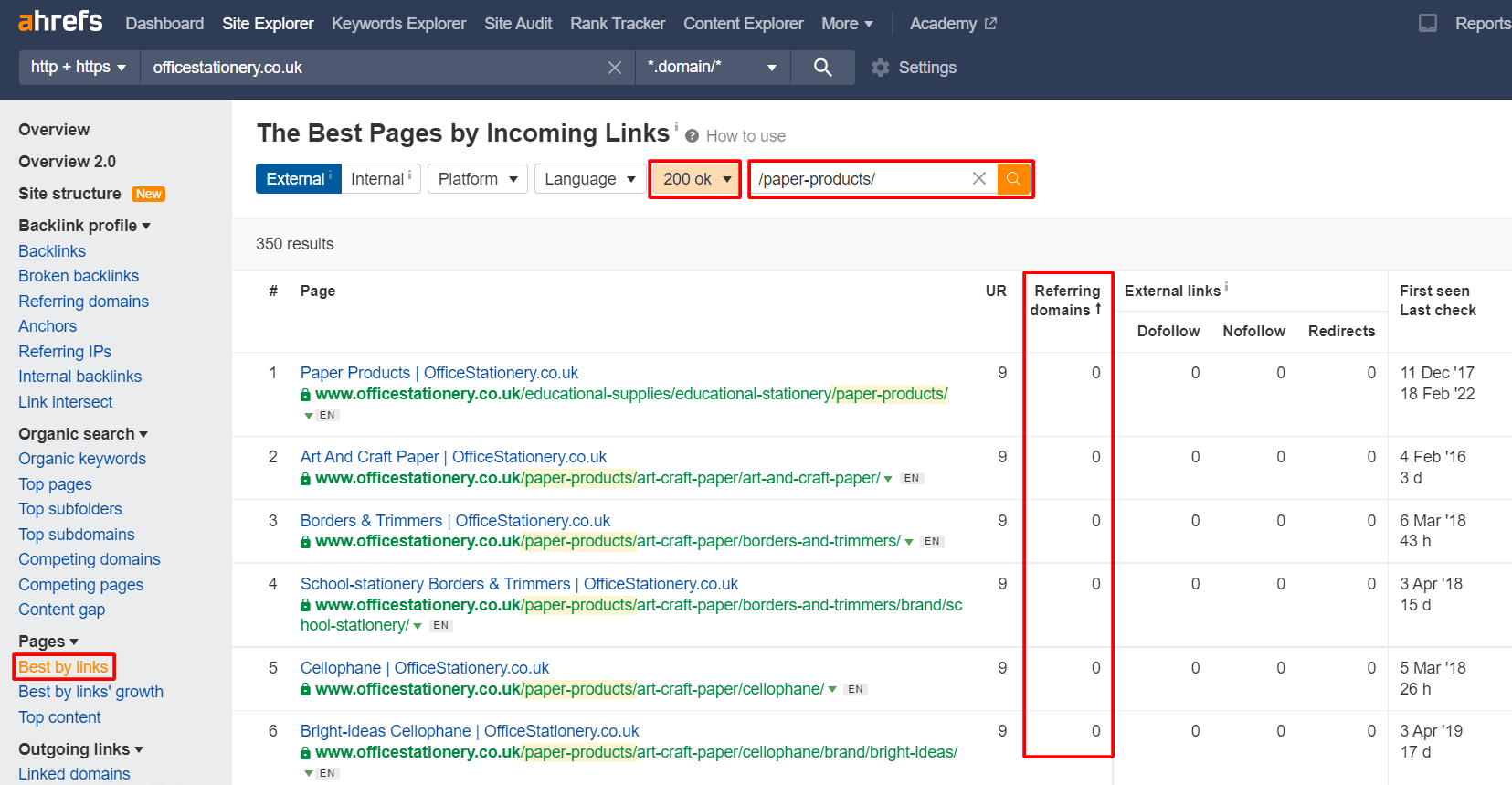
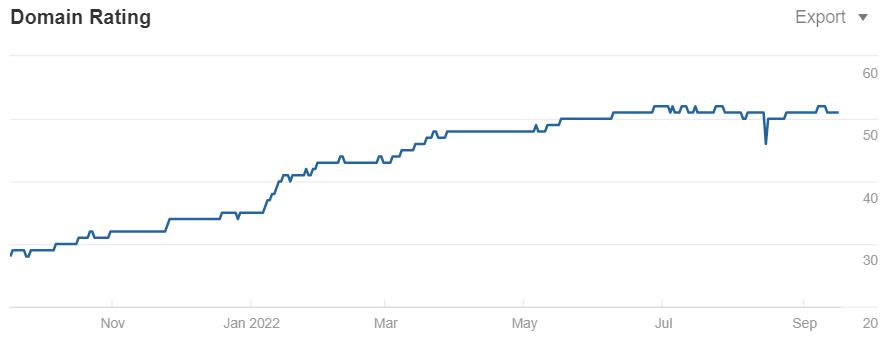
You now have a list of pages that require a ranking boost with backlinks. This link building strategy has resulted in our client’s Domain Rating (an Ahrefs metric used to measure the strength of a website’s backlink profile) seeing consistent growth over the course of the campaign.
The DR grew from 28 to 51 within twelve months.






![How to Sell GEO: The Agency Playbook [Webinar]](https://susodigital.com/wp-content/uploads/2026/10/Webinar-How-to-Sell-GEO-The-Agency-Playbook-920x920.webp)