The Strategy
Below, you’ll find an in-depth look at the steps we’ve taken to improve our client’s organic search traffic by resolving the underlying issues plaguing their site.
Keep in mind that this strategy was planned out following a thorough audit of the website – it’s always recommended to carry one out before implementing any fixes to be sure that you’re tackling the most pressing issues.
Index Management
Many website owners may overlook the issues that index bloat can present to a site’s SEO performance. They think that the more sites are indexed by search engines, the higher the visibility of their website will be. Unfortunately, this is not the case.
Some pages shouldn’t be indexed because they waste the precious crawl budget of your website. If crawlers waste time on going over pages that are irrelevant, duplicate, outdated, or redirect users to other content, they may not discover the pages that are actually important.
A few poor quality pages getting indexed is not really a big deal. However, our client had hundreds upon hundreds of them, which negatively affected their SEO.
Here are some of the most common page types that can result in significant index bloat:
- Paginated pages: if you have content spread across multiple pages, only the first one really needs to be indexed.

- HTTP pages: if you’ve moved on to the more secure HTTPS protocol (and if you haven’t, you really should), HTTP pages may linger on your website.

- /author/ pages: author pages can provide some useful context to readers who have already found your website, but there is no need to index them for search engines.

- /tag/ pages: tag pages are useful to categorise the content on your website and see what visitors are looking at, but like author pages, they aren’t the best use of your crawl budget.

- www. and non-www. pages: pick either a www. or non-www. URL structure and stick to it.

The pages listed above are the most common culprits, but there are other page types you might want to identify to free up your crawl budget.
- Duplicate pages: multiple pages that contain the same content.
- Trailing slash pages: if you follow a URL structure with a trailing slash “/” at the end of your URL slug, make sure that you don’t index pages without it, as that will create two identical pages.
- Thin content pages: pages that have no value to the end user, e.g. empty category pages, placeholders, thank you pages.
- Test or dev pages: leftover pages from the website development process.
Now that you know what kinds of pages to focus on, there are a few things you can do to make sure that they don’t get indexed:
- Noindex tag: this tag instructs Google not to index a specific page. It’s a simple fix that can be done by adding the following code to your page:
<meta name=”robots” content=”noindex”>
- Deleting the pages: if you’re certain that you don’t need a specific page on your website, you can simply delete it altogether.
Removal Tool: this is a temporary fix. Google’s URL Removal Tool allows you to take out URLs from the search engine’s index for up to six months. It’s a good solution if you’re planning to update a specific page at a later date.
Improving Page Speed
While it’s no longer a direct ranking factor, page speed is still a crucial part of the user experience on your website.
If pages take too long to load, users will simply leave your site and head to another, faster one, which has a direct impact on your bounce rate. As opposed to page speed, bounce rate remains an important ranking factor, so it’s in your best interest to optimise your website’s performance as much as possible.
To help our client improve their page performance, we did the following:
- Lazy loading videos and images: instead of pulling all of the resource-heavy files on your page all at once, lazy loading enables you to load them up when they’re actually needed. This is useful for longer pages where the users are likely to not reach the bottom, so there’s no need to access the files there. Read more about lazy loading and how to implement it here.
- Minifying JavaScript and CSS files: this entails removing any and all unnecessary characters from your pages’ CSS and JavaScript files to reduce load times. Tools like Terser (for JavaScript) and Totpal (for CSS) will help you do it quickly and efficiently.
- Image compression: large images are a common problem among websites with long loading times. Keeping all the images on your site under 100KB can radically improve its performance. Some useful image resizing tools include TinyPNG, Image Compressor, or Birme.
Blog Expansion
Topical authority is crucial, especially for websites that deal with “Your Money or Your Life” (YMYL) content, which was the case for our client. Having a blog section that’s populated with useful, factually accurate articles that pertain to your website’s subject matter will make your pages more likely to rank higher.
On top of that, a regularly updated, relevant blog will:
- Improve your keyword visibility for less competitive, long-tail keywords
- Provide you with more internal linking opportunities to your core pages
Extensive keyword research and identification of content gaps is the first step of the blog expansion process. Then, you should devise a sound content strategy that will guide you through covering all of the important topics. If you’re how to source blog post ideas, here are some good ways to get started:
- Competition Research: take a look at what your competitors are posting, and see whether or not they cover subjects that are missing from your own blog. You can do it by heading over to their blog sections one-by-one, or doing a site search on Google by typing “site:competitor-name.com inurl:/thoughts/” into the search bar.
- AI Tools: using ChatGPT for SEO can come in handy, especially when you need to come up with a list of content ideas quickly or are starting from scratch for a brand new website. It can be done using the following prompt template:
“Generate X blog post ideas about X industry/niche”
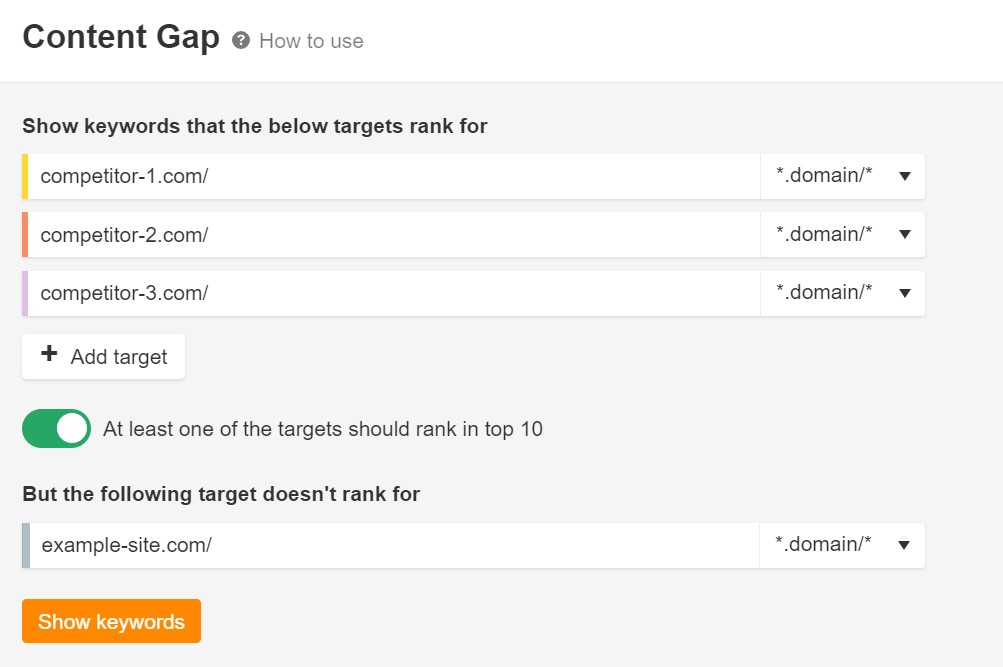
Ahrefs Content Gap: the Ahrefs Content Gap report will provide you with a list of keywords that are missing from your blog, but your main competitors rank for. The tool lets you enter up to 10 competitor websites. Once you hit “Show Keywords,” browse through the list to identify any relevant keywords that your blog doesn’t rank for.
Optimising the Service Pages
Creating new content for your service pages from scratch is not always the best way to go about optimising them for search engines. Oftentimes, all they need is a bit of uplifting and expanding to get them ranking on the SERPs.
Here are a few handy tips that will help you make the most out of your service pages:
- Expanding Descriptions: your service/product descriptions might be too brief for users to get enough information about them. Expanding these descriptions to make them as descriptive and useful to readers as possible can go a long way in terms of increasing the pages’ visibility.
Look up the keywords relevant to your particular service and try to incorporate them into your newly-expanded copy.
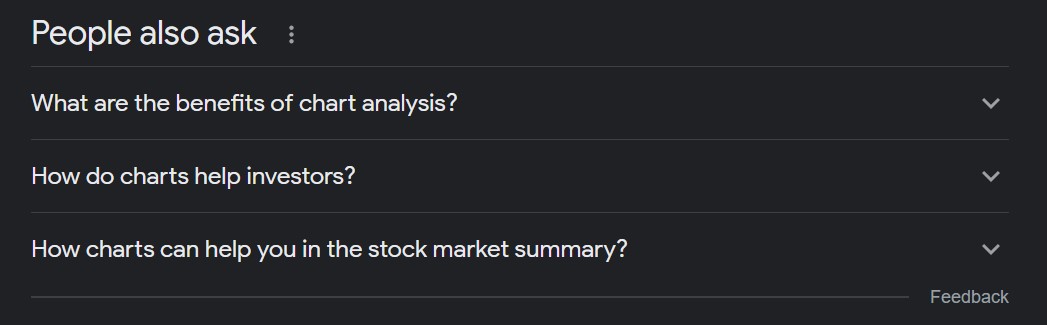
- Adding a FAQ Section: a “Frequently Asked Questions” section doesn’t only provide additional value to readers, but it also poses an opportunity for your service page to be featured in the “People Also Ask” part of Google Search Results, helping you drive more traffic to your website. Use “People Also Ask” to come up with relevant ideas for the FAQ.
- Incorporating Videos into the Page: adding more visual ways for users to interact with your service page can help reduce your bounce rate – people are more likely to stay longer on a page to watch a video than go through hundreds of additional words of copy.
Top tip: Rather than hosting your video files on the page itself, use YouTube embed links to keep loading times to a minimum.
- Showcasing Your Expertise: outline how your services stand out from the competition, and include any relevant authorisation or certification information in there, as well. For example, you can include former customer testimonials that praise your business, or include a list of organisations that have audited and verified your company. It’s a good way to build credibility and authority within your niche, as well as incorporate even more keywords that are relevant to your product or service.








![How to Sell GEO: The Agency Playbook [Webinar]](https://susodigital.com/wp-content/uploads/2026/10/Webinar-How-to-Sell-GEO-The-Agency-Playbook-920x920.webp)