
Key Takeaways
- According to Google, llms.txt can be ignored for Google Search. Google’s May 2026 AI optimisation guide explicitly groups it under tactics site owners don’t need.
- Chrome Lighthouse now checks for llms.txt, but in a different context. The Agentic Browsing audit category (May 2026) checks for llms.txt as a readiness signal for AI browser agents that navigate your site to complete tasks on a user’s behalf, not for search engines.
- In practice, almost nobody reads llms.txt files. Ahrefs analysed 137,000 domains and found that 97% of existing llms.txt files received zero traffic of any kind in May 2026. Of the bot requests that did arrive, AI retrieval bots (the kind that affect search citations) accounted for just 1.1%.
- The file’s main readers are agentic tools. AI agents and agentic infrastructure drove only 10.5% of bot requests in the Ahrefs study, with coding tools like Claude Code prominent. If your customers use these tools, llms.txt has a genuine use case.
- Foundational SEO is still the primary lever. Being indexed, earning snippets, and producing non-commodity content are what drive citations in Google’s AI features. No file shortcut changes that.
In traditional SEO, there are certain steps you can take to help search engines crawl the right content on your website.
One of those is the robots.txt file, which tells web crawlers like Google which pages or files they can and can’t access on your website.
llms.txt takes a different approach. Rather than controlling access, it was designed to give AI agents a structured summary of your most important content. Whether it actually delivers on that depends on which AI systems are reaching your site, something we cover in detail below.
What is llms.txt?
llms.txt is a proposed plain text file placed at the root of a website (e.g., example.com/llms.txt) that provides large language models (LLMs) with a clear, structured summary of the site’s most important content.
The file typically includes:
- A main H1 title (the only required element in the file)
- A brief site summary, typically presented as a blockquote
- Notes on the site’s structure or guidance on interpreting the provided files
- H2 sections that include Markdown-formatted lists of key links
- An Optional section to highlight lower-priority resources that can be skipped if necessary
The original goal was to help AI agents quickly identify your most important content without having to crawl everything. In practice, as we cover below, readership from AI systems is far more limited than early adoption suggested.
What’s the Difference Between robots.txt, llms.txt, and sitemap.xml?
The robots.txt file tells crawlers what they can and cannot access on a website, whereas the sitemap.xml allows webmasters to list key URLs to prioritize for crawling.
The llms.txt was designed to give AI agents guidance on how to interpret and prioritise your content. The key word is agents: it was conceived for AI systems that navigate websites on behalf of users, not the large-scale AI search systems like Google’s AI Overviews that index the web independently.
Here’s a simple table to illustrate their differences:
| File Type | Function | Use Case |
| robots.txt | Controls which crawlers can access which content. | Indexing and crawl management. |
| sitemap.xml | Lists available pages and metadata for crawlers. | Crawl prioritisation and content freshness. |
| llms.txt | Indicates which content is optimized for LLMs. | Inference-time guidance for AI systems. |
What’s the Difference Between llms.txt and llms-full.txt?
The llms.txt and llms-full.txt files serve different but complementary roles in making your site AI-friendly.
- llms.txt acts like a table of contents, providing summaries, context, and prioritised links to help AI models quickly understand your site’s structure.
- llms-full.txt is a comprehensive, single-file version of your site’s content, often including full page text, API docs, and support resources for deeper AI analysis.
| Feature | llms.txt | llms-full.txt |
| Purpose | Overview + navigation | Full content access |
| Size | Small + focused | Large + detailed |
| Best for | AI search & discovery | Deep AI analysis |
| Analogy | Table of contents | The whole book |
In design terms, llms.txt guides AI agents to what matters most, while llms-full.txt gives them everything in one go. The distinction is more relevant for agentic tools than for AI search crawlers, most of which don’t read either file.
Does llms.txt Matter for AI Search?
The short answer: for Google Search, no. For agentic browsing, yes. And understanding the difference matters.
Google Search: llms.txt has no effect
Google has consistently stated that llms.txt is not used by its Search systems. The file won’t influence whether your pages appear in AI Overviews, AI Mode, or standard Google Search results.
In May 2026, Google published its first official AI optimisation guide under a new Generative AI fundamentals section of Search Central. The guide is unusually direct. It lists llms.txt alongside content chunking and AI-specific rewriting under a section titled “Mythbusting generative AI search,” explicitly grouping it among tactics site owners can ignore for Google Search.
Google’s position is that its AI features run on top of its core Search index via RAG, and that the same ranking signals governing traditional SEO therefore govern what gets cited in AI responses. Independent research complicates that. Ahrefs tracked citation overlap between AI Overviews and top-10 Google rankings across 863,000 keywords and found it dropped from 76% in July 2025 to 38% by early 2026. A separate BrightEdge analysis put the overlap even lower, at around 17%. Rankings still matter and remain the strongest single predictor of AI Overview inclusion, but they are no longer the clean lever for AI visibility they once appeared to be. For AI assistants like ChatGPT, the overlap with Google’s top 10 is lower still, averaging around 7%.
The baseline argument stands: a page that cannot be indexed cannot be cited. But treating SEO and GEO as identical disciplines understates the gap that is already visible in the data. In any case, for the purposes of llms.txt specifically, none of this changes Google’s verdict: the file adds nothing to a system that already has the full web indexed.
Google’s guide states it is “completely fine” to maintain an llms.txt for other services, but confirms Google Search ignores it entirely.
Agentic browsing: llms.txt is now a Lighthouse check
In early May 2026, around 10 days before Google’s Search guide landed, Chrome’s Lighthouse tool (v13.3.0) added a new Agentic Browsing audit category. It includes a discoverability check for llms.txt.
This audit assesses how well a site is prepared for machine interaction by AI agents: browser agents that navigate and act on websites on behalf of users (booking, researching, comparing). If the llms.txt file is missing, the check returns Not Applicable, not a failure. If the file exists but returns a server error, Lighthouse flags it.
The logic behind the check is the inverse of why Google Search doesn’t need it: an AI agent browsing at inference time has no index to draw from. It has to figure out your site structure on the fly, and llms.txt helps it do that efficiently.
So is Google contradicting itself?
At first glance it looks like two parts of Google documentation are saying opposite things: Search Central says ignore llms.txt, while Chrome says it checks for it. The reason this feels contradictory is that both pieces of guidance are correct. They are aimed at completely different audiences.
Google Search is a large-scale indexing system. It crawls the entire public web, stores it in a search index, and uses that index to generate AI responses. A summary file is redundant because Google already knows what’s on your site.
Agentic browsing is something different. A browser agent navigating your site to complete a task doesn’t have an index. It encounters your site cold, at the moment it needs information. An llms.txt file gives it a fast, clean map of what’s available and what to prioritise.
So when Google Search says “llms.txt won’t help your AI Overviews visibility” and Chrome’s Lighthouse says “we check for llms.txt as part of agentic readiness,” they are both right. The distinction is which AI system is consuming your content: a search engine with a full web index, or a browser agent navigating your site live.
What the data actually shows
Ahrefs’ June 2026 analysis of 137,000 domains (using Ahrefs Web Analytics and Bot Analytics server logs) gives the most complete picture to date of who actually reads these files.
Among those 137,000 domains, 28% publish a valid llms.txt file. Of those, 97% received zero traffic of any kind in May 2026. No bots, no humans, nothing. The 3% that did get requests revealed a telling breakdown: AI retrieval bots, the kind that fetch pages for live search citations in ChatGPT, Perplexity, and similar platforms, accounted for just 1.1% of requests. The largest AI category was agentic infrastructure at 10.5%, with coding tools like Claude Code prominent.
One finding that cuts against a common assumption: AI bots never go looking for llms.txt files that don’t exist. Every request to a missing file came from humans, likely SEOs checking competitors. Publishing the file does not put you on any AI radar by itself.
Google’s John Mueller, when asked about the apparent contradiction between Search Central and Lighthouse (covered in the Ahrefs study), described llms.txt as “not done for search” and framed it as a “temporary crutch” for AI coding tools parsing developer documentation, not something general sites need.
What Does an llms.txt File Look Like?
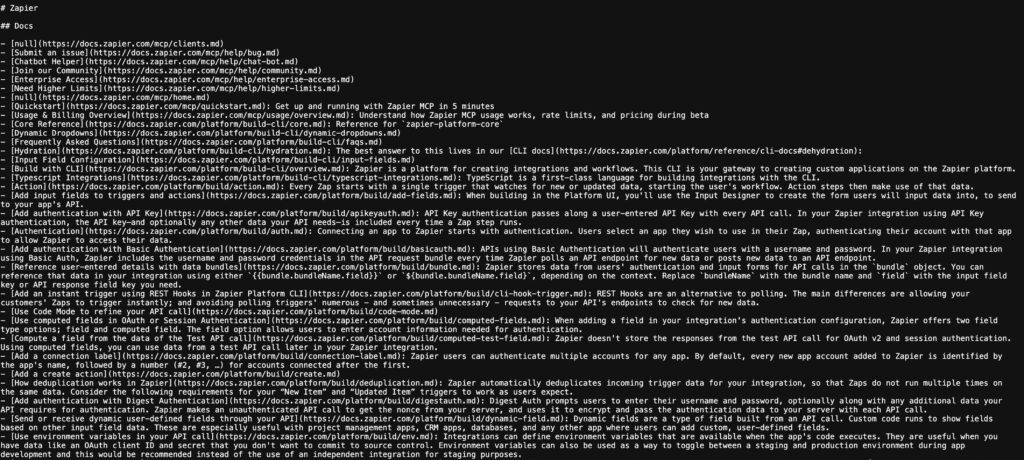
The llms.txt file is still in early adoption, but a few published examples (like Anthropic’s) provide a clear template.
The file should follow a structured Markdown format and be placed at the root of your domain (yourdomain.com/llms.txt). Here’s a recommended structure:
- Use Markdown format, saved as a .txt file.
- Start with an H1 (#) containing your site or project name.
- Add a blockquote (>) to briefly summarize the purpose or context.
- Organise content with H2s (##) for sections like services, documentation, or product areas.
- Under each H2, list important links using: [Page Title](https://yourdomain.com/page): Short description
- Include an ## Optional section for lower-priority or skippable links.
You can browse over 600 live examples in the public llms.txt directory for inspiration.
How to Create an Effective llms.txt File
Let’s break down how you can create an effective llms.txt file for your website.
1. Use a Simple Markdown Structure
The file is written using simple Markdown.
Use the following syntax to denote different elements:
# for H1 headings
## for H2 headings and so on
- for bullet points
To create paragraphs, use a blank line to separate one or more lines of text.
You can find the full syntax here.
2. Start With a Heading and Short Summary
The heading should detail your site name and include a short description of what your site is about/does.
# Your Site Name
>>> A one-line summary of what your site does
Here’s an example:
# MyCookingSite
>>> A blog with simple home cooking recipes and tips.
3. Add Section Headings for Major Content Categories
Use H2 headers (##) to organise your key content:
## Important Section 1
## Important Section 2
## Important Section 3
Example:
## Recipes
## Cooking Tips
4. List Important Pages Under Each Section
For each key page, include the title as a link and a short description.
Avoid including every URL on your site into the file. Instead focus on:
- Content that answers specific questions.
- Pages structured for comprehension.
- Authoritative pieces that demonstrate you as an expert within your industry i.e. thought leadership pieces, studies, whitepapers etc.
- High-value guides, resource hubs, and pillar content.
Syntax to use:
– [Title](URL) – Short description.
Example:
– [Beginner Pasta Recipe](https://mycookingsite.com/beginner-pasta) – Easy pasta dish for new cooks.
– [Healthy Salad Guide](http://mycookingsite.com/healthy-salads) – Nutritious, quick salad ideas.
5. Add Optional Content in a Separate Section
To mark content that AI tools can skip if space is limited:
## Optional
– [Title](URL) – Short description.
Example:
## Optional
– [About Us](http://mycookingsite.com/about) – Learn about the blog and the team behind it.
6. Save and Upload the File
Save your document as llms.txt and upload it to your website’s root directory so it’s accessible at yourdomain.com/llms.txt.
Here’s what our small llms.txt example would look like:
# MyCookingSite
> A blog with simple home cooking recipes and tips.
## Recipes
– [Beginner Pasta Recipe](http://mycookingsite.com/beginner-pasta) – Easy pasta dish for new cooks.
– [Healthy Salad Guide](http://mycookingsite.com/healthy-salads) – Nutritious, quick salad ideas.
## Cooking Tips
– [Kitchen Basics](http://mycookingsite.com/kitchen-basics) – Essential skills and tools for beginners.
– [Time-Saving Tricks](http://mycookingsite.com/time-saving-tricks) – How to cook efficiently on busy days.
## Optional
– [About Us](http://mycookingsite.com/about) – Learn about the blog and the team behind it.
7. Keep it Up to Date
Add a “Last updated” note at the bottom if needed.
_Last updated: June 2025_
8. Test it Out
You can manually paste your llms.txt into an LLM like ChatGPT and ask questions about your site to check whether the structure and descriptions are clear. This is a quality test of the file’s content, not a test of whether AI tools automatically pull it from your domain. Several tools online, like this one, will also generate an llms.txt for you automatically.
Looking Ahead: Will llms.txt Become Standard Practice?
The picture has become more nuanced.
Google has drawn a clear line for its own systems: llms.txt has no influence on Google Search or its generative AI features. The reasoning holds. Google’s AI responses are built on the same index that powers traditional Search, so any content that is properly crawlable and indexable is already visible to Google’s AI without any additional files.
But that’s not the end of the story. The Chrome Lighthouse agentic browsing audit, the growing ecosystem of AI browser agents (Claude in Chrome, OpenAI agents, autonomous research tools), and Anthropic’s own published guidance for agent-facing content all point in the same direction: as agentic browsing matures, llms.txt is becoming part of the readiness checklist for a different kind of AI interaction.
For most websites, it remains low-risk and low-effort to implement. If your site structure is already clean and the content is current, adding an llms.txt is a minor investment with potential upside as the agentic web develops. For large sites where maintaining it would be genuinely expensive, the case to prioritise it over higher-impact work is harder to make.
The Ahrefs data serves as a useful reality check: 97% of existing files go unread. If you create one, route agents to it by linking it from your HTML or documentation, because AI bots do not go looking for files that aren’t surfaced to them. The broader principle remains unchanged: the biggest determinant of your visibility in AI-generated responses is the quality and crawlability of your content, not the presence of any supporting file.
FAQs
-
Will llms.txt help my site appear in AI search results?
It depends which AI system you’re asking about.
For Google Search, AI Overviews, and AI Mode: no. Google’s May 2026 optimisation guide is explicit that the file has no effect on how Google crawls, indexes, or cites your content. Google’s AI features run on the same index as standard Search, so the standard SEO fundamentals are what matter.
For agentic browsing: it can help. Chrome’s Lighthouse added an llms.txt check to its Agentic Browsing audit in May 2026, and AI browser agents that navigate your site to complete tasks on a user’s behalf don’t have a search index to draw from. The file helps them orient quickly. Google’s John Mueller has described this use case as llms.txt’s genuine home: a reference for AI coding agents and tools, rather than a ranking signal for search.
For other AI platforms like ChatGPT or Perplexity: there’s no confirmed benefit. Ahrefs’ study found that AI retrieval bots (the ones powering live AI search queries) accounted for just 1.1% of all requests to llms.txt files that received any traffic at all.
-
Should I bother creating an llms.txt file?
Probably not a priority, but it is low effort if your site is already well structured. Ahrefs’ analysis of 137,000 domains found that 97% of llms.txt files received zero traffic of any kind in May 2026. Of the small fraction that did attract visitors, the most active readers were agentic infrastructure tools and coding agents, not AI search bots.
The clearest use case is documentation and developer-facing sites where customers use AI coding assistants like Claude Code. Outside that, the file is optional. If a platform like Wix or Framer generates it automatically, there’s no reason to remove it. If you’re spending time creating it from scratch when your core SEO needs attention, that’s the wrong priority.
-
Will llms.txt help me show up in ChatGPT or Perplexity?
Based on current evidence, no. In Ahrefs’ May 2026 study of 137,000 domains, AI retrieval bots (the type that fetches pages to answer live queries in ChatGPT, Perplexity, OAI-SearchBot, and similar) made up just 1.1% of requests to the small fraction of files that received any traffic at all. What drives visibility in those platforms is consistent with what works for Google: well-structured, authoritative content that earns citations through normal indexing.
-
What should I actually focus on for AI visibility?
SEO fundamentals are the strongest foundation, but the relationship between traditional rankings and AI citations is more nuanced than Google’s official guidance implies. Google’s position is that GEO and AEO are still SEO, and the baseline holds: pages need to be indexed and snippet-eligible to appear in AI responses, so clean technical structure and high-quality content remain the starting point.
The independent research tells a more qualified story. Ahrefs’ 2026 study of 863,000 keywords found that only 38% of AI Overview citations come from pages in Google’s top 10, down from 76% the previous year. For AI assistants like ChatGPT, the overlap with Google’s top 10 is around 7%. Rankings are the best starting point but not a guarantee of AI visibility, and the relationship appears to be weakening. Factors like YouTube presence, third-party mentions, and topic cluster depth are playing an increasing role in what gets cited. Do the SEO fundamentals. But do not assume that ranking well for a query automatically translates into appearing in the AI response for it.
-
Who is actually reading llms.txt files?
Mostly bots, but not the ones most people expect. In Ahrefs’ study, 96% of requests to llms.txt files came from bots. The breakdown is the surprising part: SEO audit tools sent 21.7% of requests, while all AI bots combined accounted for 19.5%. The biggest AI category was agentic infrastructure at 10.5%, covering tools like Claude Code. AI retrieval bots (the ones powering ChatGPT and Perplexity search) were just 1.1%.
A further 12% of requests came from tools studying and scoring llms.txt itself: GEO/AEO readiness scanners, llms.txt validators, and research crawlers. An entire auditing ecosystem has formed around the file before any major AI platform has confirmed it reads it.