Key Takeaways:
- An FAQ section that answers the questions buyers and search engines actually ask, can bring you tangible SEO wins.
- In 2026, FAQs do double duty: they can help you rank in classic search results, while also feeding Google’s AI Overviews, Perplexity answers, and ChatGPT responses your customers now read.
- Conversational phrasing and clean question-style headings make an FAQ readable to both humans and AI engines. Schema markup is worth adding for SEO clarity, though AI engines can extract FAQ structure from your visible content.
- Pick questions with real search demand and customer relevance, and provide concise, actionable responses that satisfy the user intent.
- Don’t copy and paste FAQ blocks across multiple pages. Duplicate FAQ content can suppress every instance of it.
A Frequently Asked Questions section (FAQs) is one of the easiest pieces of content that you can produce for your website, and in 2026, it’s working harder and performing better for your SEO than ever. Here’s how to find the right questions, write them properly, and structure FAQs so both Google and the AI engines actually use them.
What is an FAQ Page?
An FAQ (Frequently Asked Questions) page contains answers to common questions about a specific product or service available on a website. FAQs can be placed on a page of their own, or added as a section to an already existing page.
A well-done FAQ page or section helps potential customers find the information they need about your brand and the products and services it offers before they buy.
It also offers additional SEO benefits.
Are FAQ Pages Good for SEO?
Yes, if they’re done correctly. A page built around random questions with quick answers won’t bring the desired results. A useful FAQ section needs careful thought and proper keyword work to do anything for SEO. Read on for how.
For a high-quality FAQ page, you want user-friendly content that gives the best answers to the most common questions, written from the customer’s point of view.
FAQ for SEO: Why FAQs Earn Their Place in 2026
FAQ content has shifted role in 2026. Google deprecated FAQ rich results on 7 May 2026, ending the expandable Q&A dropdown that used to sit beneath organic listings. For nearly three years before that, the feature was already restricted to authoritative government and health sites, so for most of the web the deprecation finished a withdrawal that had been underway since 2023. What it doesn’t mean is that FAQ content is dead. Crawlers still use FAQPage structured data to understand pages, and FAQ-shaped content is exactly what AI engines pull into their answers.
Look at any AI Overview, Perplexity answer, or ChatGPT response. The structure is always question, then answer. Sometimes a list, or a definition. Either way, the thing that gets pulled into those answers, more often than not, is content shaped exactly like a well-built FAQ.
GEO (Generative Engine Optimisation) explains why. AI search engines parse content differently from how Google did a few years ago. They want:
- Conversational phrasing, the way someone would actually ask a question – and respond to it. LLMs don’t need text stuffed with exactly matched keywords to understand the semantics and pull answers from it.
- Query-style headings that mirror real search intent, where the H2 or H3 itself reads like a question.
- A clear visible structure that signals what’s a question and what’s an answer. LLMs generally have no trouble parsing this from clean HTML alone, but structured data on top adds technical clarity for traditional search.
An FAQ section that ticks those boxes does double the work. It ranks well in classic search results and shows up in AI answers when your competitors don’t.
The other reason FAQs still pay off in 2026 relates to the principle of trust. People simply don’t trust generic landing-page copy. They trust a page that anticipates their concerns and answers them in plain language.
For 2026, it’s also worth thinking about query fan-out. When LLMs receive a query, they typically expand it into several sub-queries to assemble an answer that addresses not only the original query, but also those related sub-queries. Adding FAQs to a page is a great way of fanning out the page’s original query and satisfying the user intent in a much more comprehensive way, which is what answer engines value and reward with citations.
Why Create an FAQ Page?
A well-set-up FAQ page or an FAQ section is a valuable knowledge base for your website that benefits your customers, your brand, and your SEO.
- It makes buying simpler and faster. If your customers have all the answers up front, they don’t need to chase your support team and wait around. The less hassle, the higher the chance they’ll buy.
- It saves your time too. If your FAQ page answers customers’ questions well, it becomes the first place they look before contacting you directly. If they ever do.
- It helps you become more transparent and build trust with your customers. Transparency matters for your brand’s success, and a high-quality FAQ section embeds it in your strategy. Sharing details on shipping or returns can lift loyalty between you and your buyers.
- It boosts your site’s internal linking. If your FAQ page links to related content, users can navigate the site more easily. Internal links also matter for search visibility, lifting your chances of ranking higher.
- If enough people are asking a question, and you give a great answer that nails what the user wants, your odds of ranking high for this search query or landing an AI citation go up.
What to Put on a FAQ Page or Section: Choosing the Right Questions
The questions that matter are the ones people are typing into search engines, your website’s own search box or chatbot, and asking your support team.
A useful FAQ section sits at the intersection of three sources: questions customers actually ask, questions that have search volume, and questions where your answer might genuinely help someone decide.
The 5 Standard Questions Every Site Needs
Almost every site benefits from answering these common questions in the website’s FAQ section:
- What do you actually do or sell? A plain-English version of your value proposition. Not the homepage hero copy. The version your aunt would understand.
- How much does it cost? Pricing, ranges, or “depends on” with the variables spelt out.
- How long does delivery, fulfilment, or onboarding take? Real-time windows, not vague reassurances.
- What’s your returns, refund, or cancellation policy? Specifics. Numbers. Conditions.
- How do I contact a real human? Email, phone, hours. A site without this answer always feels suspicious.
If you publish nothing else, always publish those.
Sample FAQ Questions That Earn Rankings
Once the standards are sorted, focus on layering product- and topic-specific questions. Examples that work in the wild include:
- “How do I know what size to order?” (apparel, footwear, home goods)
- “Can I install this myself, or do I need a professional?” (home improvement, equipment)
- “Is [product] safe for [pets/children/pregnancy]?” (food, household, cosmetics)
- “What’s the difference between [Product A] and [Product B]?” (compares your own SKUs, ranks for comparison searches)
- “How do I cancel my subscription?” (SaaS, memberships, streaming)
- “Do you ship to [country/region]?” (e-commerce, especially international)
- “Is there a warranty? How long?” (electronics, furniture, appliances)
- “Can I use this with [common edge case]?” (combine with X, work alongside Y)
The common thread is that they are things customers ask before, during, or after a purchase, and they have search demand outside your site too.
How to Find FAQs
A quality FAQ section’s most important part is the questions you want to answer. Finding them is the first step to take before starting to build your page.
There are the most useful techniques that can help you find your FAQs:
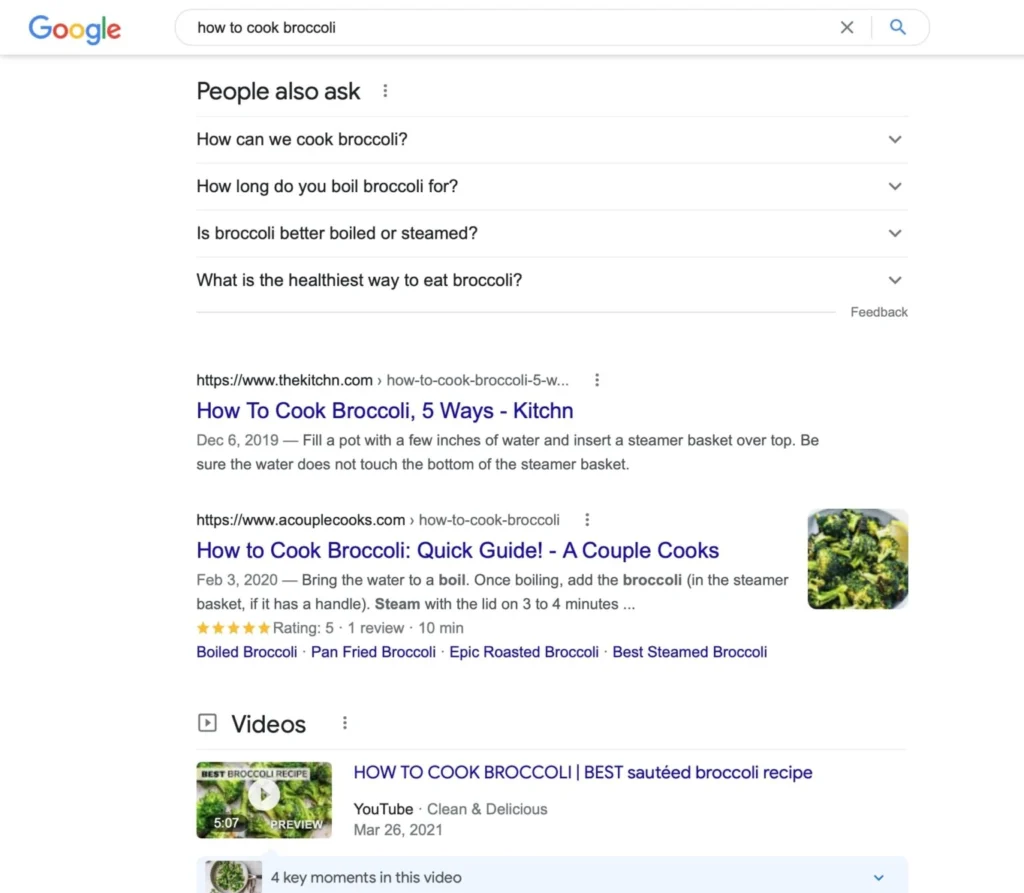
People Also Ask
- Type a relevant keyword applicable to your product or service into Google and press search.
- Scroll down to the People Also Ask section, which contains other relevant questions related to the searched term.
- You can click on any of the suggested questions to get a short answer along with additional commonly asked questions to find FAQs suitable for you.
Related Searches
While you’re still on that page, scroll down to the very bottom, and you may be able to find a list of related searches for more information about your original search.
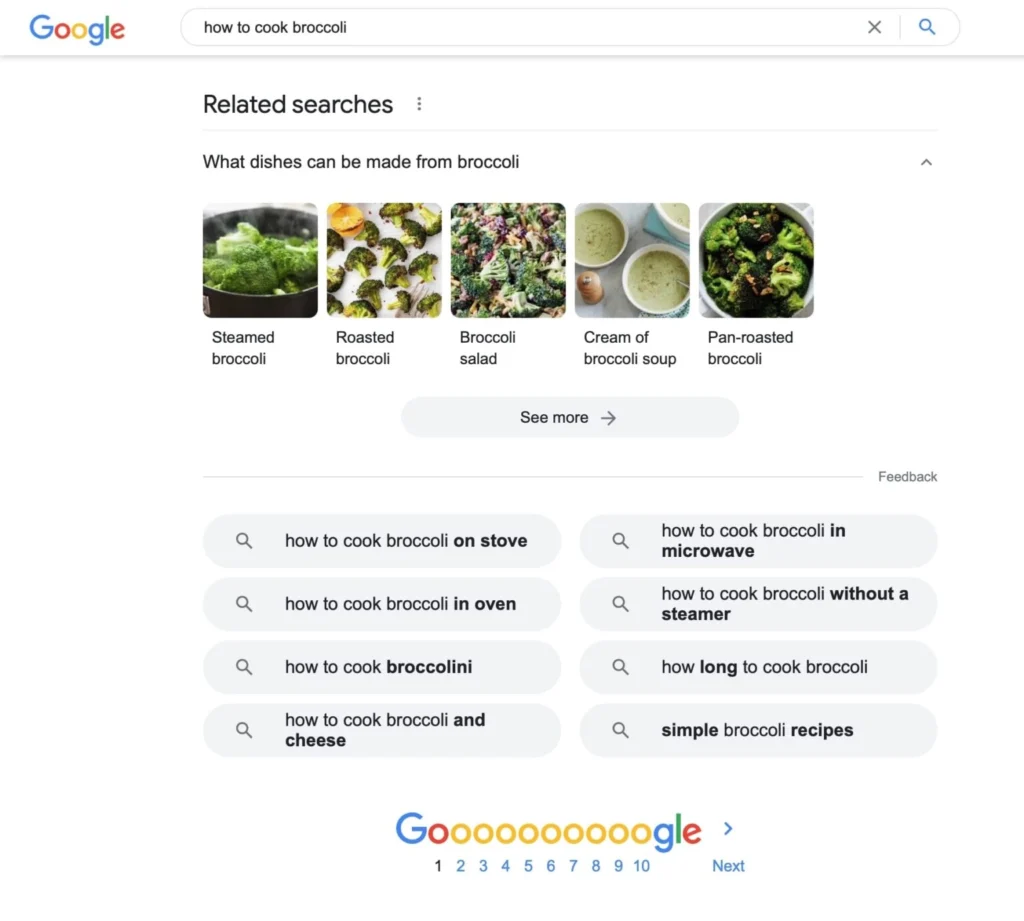
From the example above, instead of just writing an answer for “how to cook broccoli”, you can also write answers to more specific questions like “how to cook broccoli on the stove”, “how to cook broccoli in the oven”, and so on.
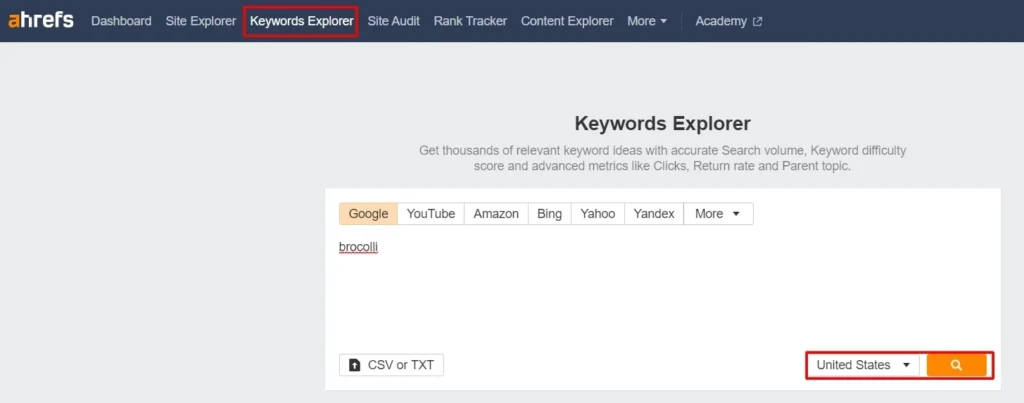
Ahrefs’ Keyword Explorer
Researching your keywords is a great way to address your FAQs for SEO. You can do so with the help of a keyword research tool like Ahrefs’ Keyword Explorer.
1) Type in your relevant keyword. Before pressing search, select the correct target location.
2) Hit search and scroll down to the Questions section.
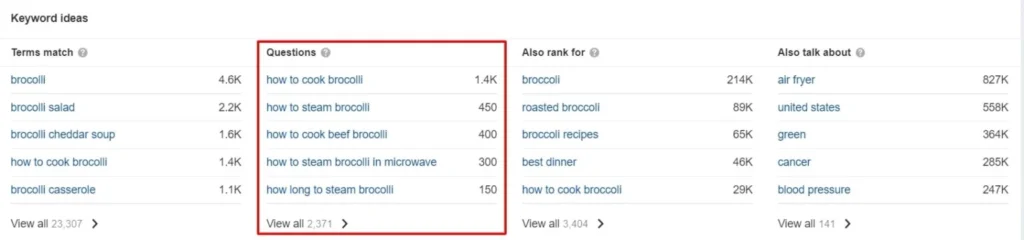
3) Press View All, and you’ll see a list of questions built around your chosen keyword.
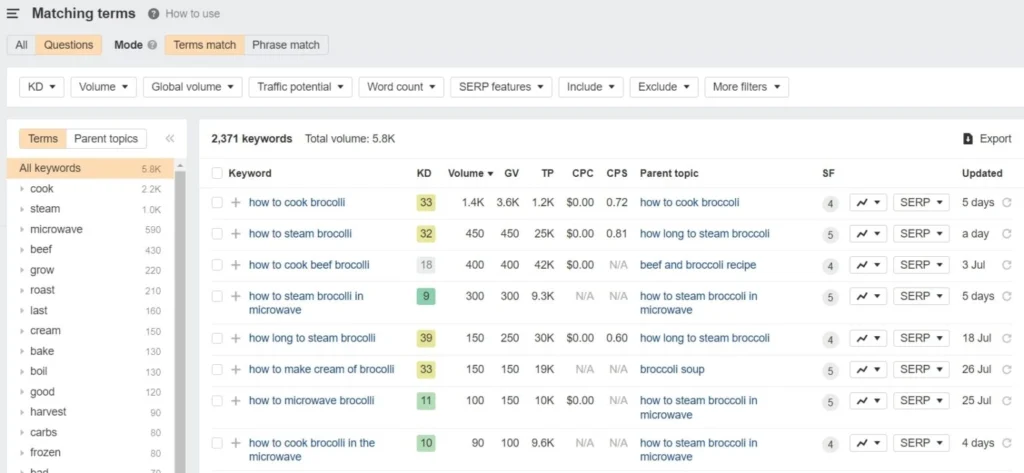
4) For more precise questions, simply use a more specific keyword.
Google Search Console (GSC)
This is your own search data. Filter by question modifiers (“how”, “why”, “what”, “can I”) to see what people are already finding you for. Questions where you rank between positions 5–20 are the ones to target with new FAQ content.
Your Sales and Customer Support Team
These are the people who spend a lot of their working time answering questions of your potential and existing customers. Assembling these questions into an FAQ page or a section may not only help your website perform better in answer engines but also save your team some time answering them individually in emails, phone calls and support requests.
AnswerThePublic
This tool pulls Google auto-suggest into a question-shaped visualisation. This is a quick way to spot the long-tail variations of a head term.
AlsoAsked
AlsoAsked maps People Also Ask trees by topic, showing how Google connects questions. This is good for working out which questions belong together in one FAQ section versus separate pages.
How to Write an FAQ Page: A Step-by-Step Guide
Now that you’ve got your questions sorted, it’s time to nail the writing.
Step 1: Group questions by intent. Cluster buying-decision stuff together, and tuck post-purchase queries into their own spot. Skip the giant, jumbled list—nobody wants to scroll forever.
Step 2: Start with the answer. Skip the fluff; hit them with the key info right away. People skim, so lead strongly and layer in details after.
Step 3: Keep answers concise. Aim for 40-60 words, that’s perfect for being helpful without dragging on. If it really needs much more than that, consider spinning it off into a linked blog post instead.
Step 4: Echo the question’s wording. For “How long does shipping take?”, kick off with “Shipping takes 3-5 business days,” not some roundabout spiel about couriers. Matching language keeps it intuitive.
Step 5: Weave in internal links naturally. Point a returns answer to your returns policy page, or shipping to the shipping details. Only if it fits—no forcing it.
Step 6: Add schema and validate it with the official Schema markup validator tool.
Readability and Tone of Voice
A good FAQ page reads like a person who knows what they’re talking about. Not a press release. Not a chatbot.
A few rules of thumb:
- Use the same voice your brand uses everywhere else. If your homepage is warm and casual, your FAQ shouldn’t suddenly turn corporate.
- Write for a Year 8 reading level. Not a dig at your audience. It’s how you stop people from skimming and missing the point.
- Cut hedge words. “May”, “could possibly”, “in some cases” make customers feel like they’re being dodged.
- Read it out loud. If you stumble, the sentence is broken.
- Avoid jargon unless the customer asks in jargon. If they ask “What’s the IP rating?”, the answer can use IP ratings. If they ask “Is it waterproof?”, don’t reply with technical specifications.
Remember, a good FAQ page doesn’t sound clever or creative. It sounds clear, succinct, and helpful.
Where To Put Your FAQs
There are a few possibilities for where to place your FAQ section on your website. Depending on the type of your questions and what they relate to, you can add them to your site’s existing pages or create a new page strictly for the FAQs.
If you’re adding questions about the same page or topic, you can add them to existing pages. As the user has all the needed answers on hand, they don’t need to go through multiple pages to find the information. That lifts the quality of the user experience.
If you’re adding a set of less relevant questions about the same page or topic, it’s better to create a dedicated page for your FAQs to answer them. In this case, you can add internal links to your FAQ section with reference to your related pages.
We have highlighted 5 different types of FAQs.
Types of FAQ Pages
Homepage FAQs
Including an FAQ section on the homepage just above the footer is one of the most common and effective techniques.
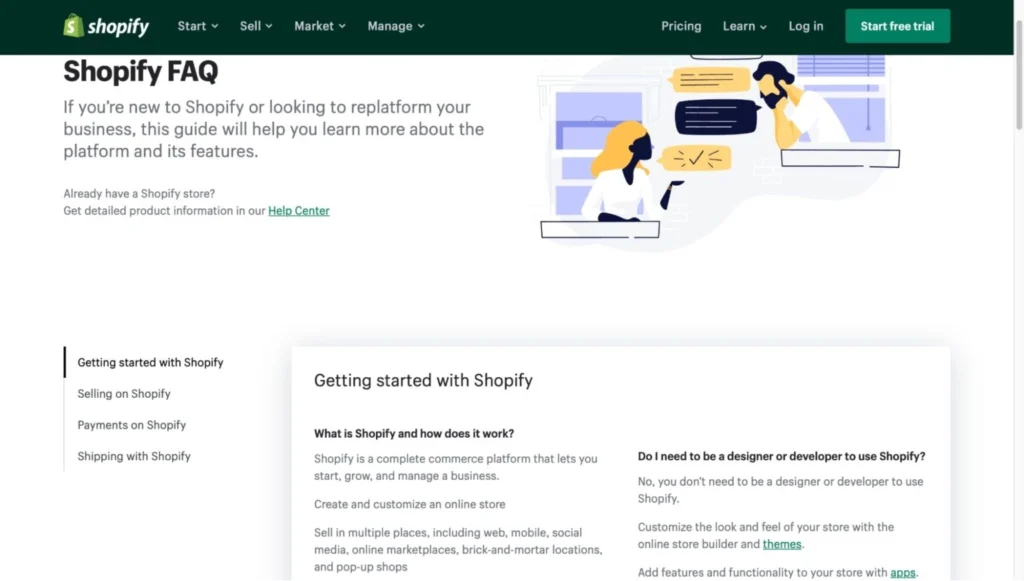
It also creates a suitable space for internal links, which help to redirect your users to the relevant pages of your website.
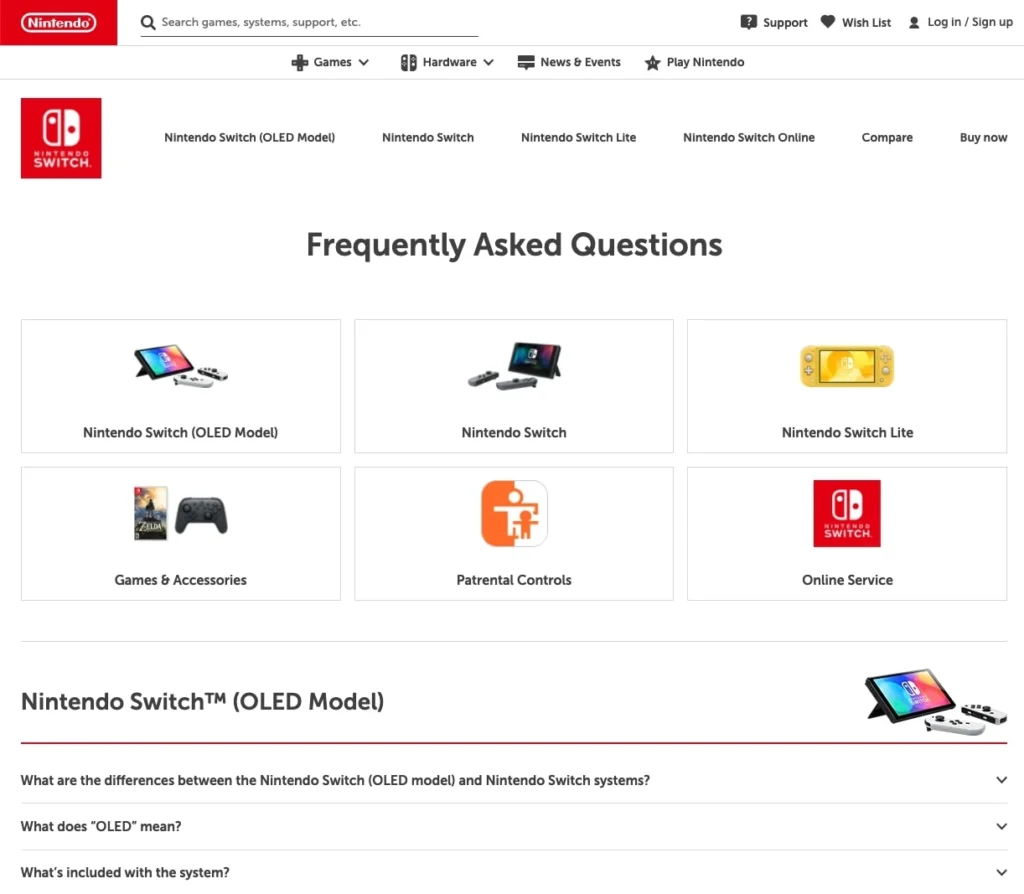
Product/Service Page FAQs
You can add FAQs that are dedicated to a particular product or service within their respective pages.
Dedicated FAQ Page
Having a separate page that’s dedicated to FAQs is another great way to display your questions, especially when there are many of them to cover.
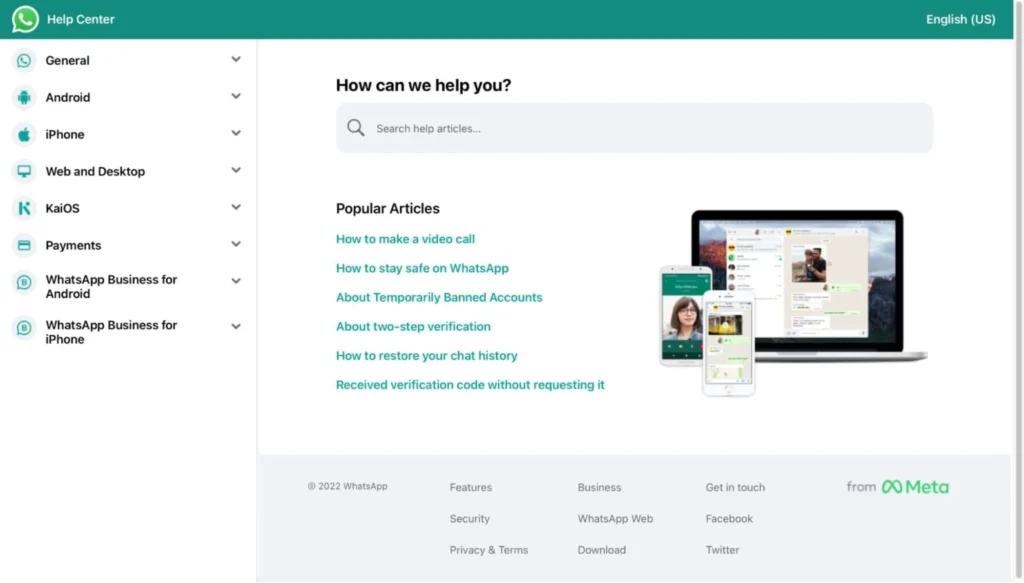
Like the homepage, the dedicated FAQ section can be a solid base for internal link building as it can be referenced on other pages of your website.
Dedicated FAQ Section at the End of a Blog Post
If you don’t want to create a separate page for your FAQs, you can add them to your existing blog post, as long as they relate to the article’s content.
Top tip: you can also combine the previous two types together by adding brief answers within your blog posts, and then adding an internal link to a dedicated FAQ page which answers the same questions, but in much more detail.
FAQs on eCommerce Product Pages
Product page FAQs are the most underused space in ecommerce SEO. Three or four well-chosen questions sitting below the product description do four things at once: they answer pre-purchase doubts, they add keyword-rich content to a page that’s usually thin on copy, they’re prime schema territory, and they let you target long-tail queries the main product copy can’t reach.
Stick to product-specific questions. “Does this fit a King-sized bed?” belongs on the product page. “What’s your returns policy?” doesn’t. That goes on the dedicated FAQ or returns page.
FAQ Section Design
FAQs Accordions vs Expanded Text
Depending on your preference regarding the website layout, you can display your FAQ page in multiple arrangements. FAQ design splits into two camps: collapsible accordions, or expanded text by default. They both work well at supplying your audience with the relevant information they might need but there are a few things to consider when choosing what works best for your website.
- Accordions keep the page tidy and let users scan questions quickly. The trade-off: some accordion implementations hide content from search engines and AI crawlers if the markup is sloppy. Use a properly-coded accordion that loads the full content in HTML on first render (not via JavaScript injection on click), and you’re fine.
- Expanded text looks heavy but maximises crawlability. Every word is in the source on page load. For shorter FAQ sets (5–8 questions), expanded text often wins.
For longer FAQ sets (15+ questions), accordions are usually the better call. Just make sure they’re search-engine-readable.
Mobile-First Design for Long FAQ Lists
Most FAQ traffic is mobile, so that’s the assumption to start from. Long expanded-text lists become unscrollable on small screens. Accordions, anchor-link tables of contents, or a search box at the top of the FAQ all help.
The basic test is to open your FAQ on a phone and try to find a specific answer. If it takes more than a few seconds, the format isn’t working.
FAQ Question Answer Format
The cleanest way to format an FAQ entry, both for humans and for AI parsers, is the explicit question-and-answer layout:

The Q-and-A markers do two useful things. They flag the structure to readers skimming on mobile, while also reinforcing the structured-data signals you will add via schema markup.
You don’t strictly need the “Q:” and “A:” labels if your H3 styling clearly separates the question from the answer beneath. The cleaner the visual structure, the easier the page is to scan and the easier it is for AI bots to parse.
Numbered vs Unnumbered FAQs
Numbering FAQs splits opinion. Some teams default to it, while others avoid it. Either way, numbering helps when:
- The FAQ list is long, and people might reference a specific question (a customer support agent could say “see Q14”).
- The questions follow a logical sequence (a step-by-step troubleshooting flow).
- The page has a navigation summary at the top linking to numbered items.
Numbering hurts when:
- The questions don’t have a natural order. Random numbering implies false hierarchy and can make customers think Q1 is “more important” than Q15.
- You’re constantly adding or rearranging questions. Renumbering becomes admin you don’t need.
For most general-purpose FAQ sections, unnumbered is the safer choice. It signals that each question stands on its own, and you can rearrange the order based on traffic data without breaking anything.
FAQ SEO Best Practices
To give users the best experience of browsing your website, you must ensure that your FAQ page is easily accessible and readable. There are some points you should take into consideration when developing your FAQ page.
Write SEO-Friendly FAQs
Search engines are designed to display well-structured FAQ pages with articulate questions rich in relevant keywords.
You can give a high-quality user experience on your FAQ page while ranking higher in the search engine with a few simple tips:
- Organise your questions. Put your questions into categories so the users can quickly find what they are looking for.
- Be consistent with your tone of voice. Make sure your FAQ section reflects the same writing style as any other page of your website to keep your brand personality in check.
- Use simple language. Your content should be easy to understand for the users. Avoid jargon that may confuse the reader.
- Give short and quick answers to your questions. Your readers want to find out the information in the shortest time possible, so keep your answers concise and to the point. If you want your answers to be longer, write them separately in the form of a blog post.
- Add internal links. Link your content to other website or resource pages to drive traffic and lift conversion (more on this later).
- Sharpen your meta titles. If you’re creating a dedicated page, sharpen up your page title, H1 heading, meta description and so on to lift the rankability of the page.
- Update your page regularly. Review your FAQ content on a regular basis. Add new questions and modify or remove older ones if needed to keep the most up-to-date version of your page.
Implement FAQ Schema Markup
An FAQ schema markup is a specialised set of structured data added to the code of a webpage to explicitly tell crawlers that the page’s content includes a list of frequently asked questions and answers to these questions.
A note on what FAQ schema actually does in 2026. Since Google deprecated FAQ rich results, schema no longer earns you a visible SERP enhancement. Google’s own AI optimization guide is explicit: structured data isn’t required for generative AI search, and there’s no special schema.org markup you need to add — but it’s still worth keeping as part of overall SEO. A recent Ahrefs study of 1,885 pages that added JSON-LD also found no meaningful uplift in citations across Google AI Overviews, AI Mode, or ChatGPT, and a related experiment showed that major AI systems extract content from visible HTML rather than JSON-LD during retrieval.
The honest summary: schema is still useful for traditional SEO, entity disambiguation, and downstream uses like knowledge graphs, but the questions and answers in your visible content do the real work for both classic rankings and AI citations.
You can add an FAQ schema markup to your site in a few easy steps:
1) Generate your FAQs:
Add your questions to a dedicated FAQ page or an FAQ section on an existing page.
2) Create and authenticate your FAQ schema markup:
Use SUSO’s free online FAQ schema generator to create your code.
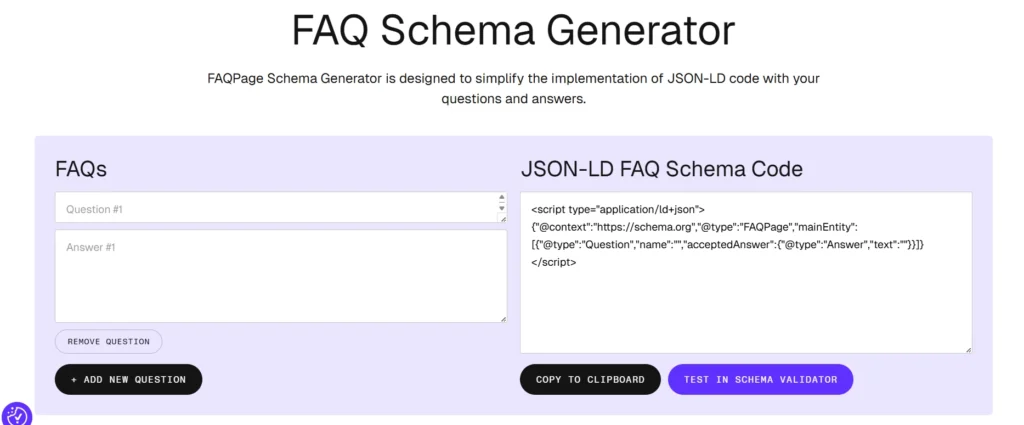
Copy your questions and answers and paste them into the code generator. Make sure the questions and answers are exactly the same as they are on your website.
3) Add the FAQ schema to your page:
The final step is to apply the markup to your site. Here are a couple of the most commonly used methods:
- Add the code manually into the <head> space of your page.
- Add it using a WordPress plugin, like Insert Headers and Footers or RankMath.
After implementing the code on your page, test it via the Schema Markup Validator tool: https://validator.schema.org/. Additionally, you can investigate your page for errors by checking it in GSC.
FAQ schema example (JSON-LD)
A minimal, valid FAQPage block with two questions looks like this:
<script type="application/ld+json">
{
  "@context": "https://schema.org",
  "@type": "FAQPage",
  "mainEntity": [{
    "@type": "Question",
    "name": "Do I still need FAQ schema in 2026?",
    "acceptedAnswer": {
      "@type": "Answer",
      "text": "It no longer creates rich results, but it still helps engines and AI tools parse your Q&A content."
    }
  }, {
    "@type": "Question",
    "name": "Does FAQ schema affect rankings?",
    "acceptedAnswer": {
      "@type": "Answer",
      "text": "No. Google has said FAQ markup is not a ranking factor."
    }
  }]
}
</script>
Add Internal Links to Relevant Pages
As mentioned earlier, internal linking matters for ensuring a high-quality overall user experience on your website. As it can also lift user engagement, you should include internal links to applicable pages on your FAQ page.
The first step before adding links to your FAQ content is to put yourself in your users’ shoes. Look at your FAQs and think about what your users will likely do next once they get the desired answer to a particular question.
For example, if your users ask about the estimated delivery time and shipping costs, they might be close to the final product purchase stage. In that case, you can redirect them to the general shipping information section by inserting the link to the relevant page and referencing your shipping partners.
Working out your users’ intent matters for building an effective and user-friendly internal linking structure on your FAQ page.
Avoid Duplicate Content Across Your FAQs
A warning, since this trips up more sites than you’d think: don’t copy and paste the same FAQ block across multiple pages.
It’s tempting. You may have written a great answer about your shipping policy, and you want it on every product page. The problem is that Google sees the duplicate copy and either ignores most of the instances or, worse, dilutes your ranking signals across them. The same goes for AI search engines, which are quick to flag boilerplate as low-quality content.
If a question genuinely needs to appear on more than one page, write a fresh version each time. Vary the phrasing. Vary the depth. Or better, link from the product page to a single canonical FAQ that owns the answer.
Schema markup makes this worse, not better. Duplicate FAQ schema across multiple URLs can trigger Google to suppress all of them.
Standard FAQ Page SEO Checklist
A quick run-through before you publish:
- Each question matches a real search query.
- Answers lead with the answer, definitely not a preamble.
- Most answers fall between 40 and 60 words.
- FAQ schema markup is validated and added.
- Questions are grouped by intent or topic, not dumped into one long list.
- Internal links point to relevant pages when helpful.
- The page loads cleanly on mobile, and accordion content is in the HTML on first render.
- No duplicate FAQs copied and pasted across multiple URLs.
- Each H2 or H3 question reads conversationally, in the way someone would actually search.
- For FAQ pages, the page’s title, H1 and meta description are written for the primary FAQ-related query.
- FAQ content has been reviewed within the last 6 months for accuracy.
FAQs
-
Why are FAQ pages important for SEO in 2026?
FAQs match how people search now. Most queries are conversational, and AI search engines pull question-style content into their answers. A well-structured FAQ section helps you rank in classic Google results and gets you cited in AI Overviews, ChatGPT and Perplexity.
-
Should I use FAQ schema markup?
Yes, with realistic expectations. FAQPage is still a valid Schema.org type after the May 2026 deprecation, and Google’s AI optimization guide recommends keeping schema as part of an overall SEO strategy. Don’t expect it to lift AI citations on its own, though. Recent research suggests adding schema produces no clear uplift in Google AI Overviews, AI Mode, or ChatGPT citations, and major AI systems extract content from visible HTML rather than JSON-LD. Schema is still worth adding for technical clarity and traditional SEO, but the questions and answers themselves are what get pulled into AI responses. SUSO’s FAQ Schema Generator produces the code if you want it.
-
How many FAQs should a page have?
Quality first. 5 to 10 well-chosen questions usually work harder than 30 surface-level ones. Add more only when you have real customer questions to answer.
-
What’s the ideal FAQ answer length?
40 to 60 words for most answers. That’s long enough to be useful and short enough to be pulled into an AI answer or featured snippet. If a question genuinely needs more, link out to a longer guide.
-
Are numbered FAQs better than unnumbered ones?
For most general FAQ sections, unnumbered is fine. Numbered lists do better when the answer is procedural (a “how to” sequence) or when customer support needs to reference specific questions.
-
Can the same FAQ appear on more than one page?
Not word-for-word. Duplicate FAQ content across multiple URLs can trigger Google to suppress all of them. Make the answer specific to this particular page, or link to a dedicated FAQ page.
-
Can FAQs still win Google featured snippets?
Yes, but not the way they used to. The dedicated FAQ rich result, the expandable Q&A dropdown beneath an organic listing, was deprecated by Google on 7 May 2026 and is no longer available to any site. The classic featured snippet, the boxed answer at the top of the SERP, is a separate feature and still works. A well-written FAQ answer in the 40–60 word range, with the question phrased exactly the way someone would search it, is still strong territory for winning that featured snippet, an AI Overview citation, or a Perplexity or ChatGPT mention.