
Key Takeaways:
- Agentic browser extensions (the AI-powered SEO agents at the heart of this guide) are side panels that read and act on the live page you are already viewing, including pages behind a login, across every tab in a group.
- Examples of what each team gets to use Claude in Chrome for: live AI Overview audits (technical SEO), AI Overview citation checks (content), placement QA (digital PR), and fast on-call page pulls (account management).
- They work through pages one by one in the browser, the way a person would. Site-wide crawls and multi-source analysis belong in MCP-connected workflows, alongside Screaming Frog, Semrush or Ahrefs (see SUSO’s MCP field report).
- Each page they handle uses tokens, since they take screenshots to see it, and browser sessions count towards your Claude plan’s usage limit. When you only need to read a page or pull data from a tool, web fetch, an API or an MCP connection is the lighter option.
- Agentic browser extensions are certainly not a replacement for human review, as every output needs a second pair of experienced eyes before it reaches a client or goes live.
- The single most important safety rule: default to Manually approve mode, and never leave the panel open over a screen showing client or company credentials, contracts or financials, because whatever is visible in its tabs is captured in screenshots and becomes part of the conversation.
- Claude in Chrome is the extension SUSO tested hands-on, and ChatGPT’s official Chrome extension is the closest equivalent. Comet, Gemini in Chrome and Copilot in Edge are built into their browsers, and Claude in Chrome only runs in Google Chrome.
A lot of the SEO day at SUSO goes on small, routine jobs that rarely get noticed: confirming a redirect, checking that a meta tag resolved the way the brief said it should, or pulling a few competitor pricing pages to see how a client compares.
Until recently each of those basic tasks meant a huge trail of open tabs and switching between multiple tools, and God help anybody whose Chrome gave up and took all forty of those tabs with it.
But there is now much needed relief from these common frustrations, in the form of agentic browser extensions that work inside the browser itself.
Claude in Chrome, ChatGPT’s browser extension, Google’s Gemini in Chrome, Perplexity’s Comet and Copilot in Microsoft Edge now work alongside the page and act on what is live in front of them, rather than answering questions about it from a cached copy.
Our guide What Agentic Browsers Mean for SEO already explains the wider market shift, so this article focuses more on what these extensions are good for on an SEO account, team by team, and how to use them on client or company sites. The use cases and rules below come from our own teams testing Claude in Chrome on live SEO work.
Whether you run SEO in-house, manage it for clients or work on the PR or marketing side, the core point holds: these tools let anyone run a fast, live page check without waiting for a specialist, provided the data rules later on are respected.
What Does an Agentic Browser Extension Actually Do on an SEO Account?
Fundamentally, an agentic browser extension is simply an AI side panel that works on whatever page you are already looking at. It reads the live version, not a cached copy, and that includes pages behind your login. Open several tabs in one group and it can see and work across all of them in the same task, moving between tabs as it goes.
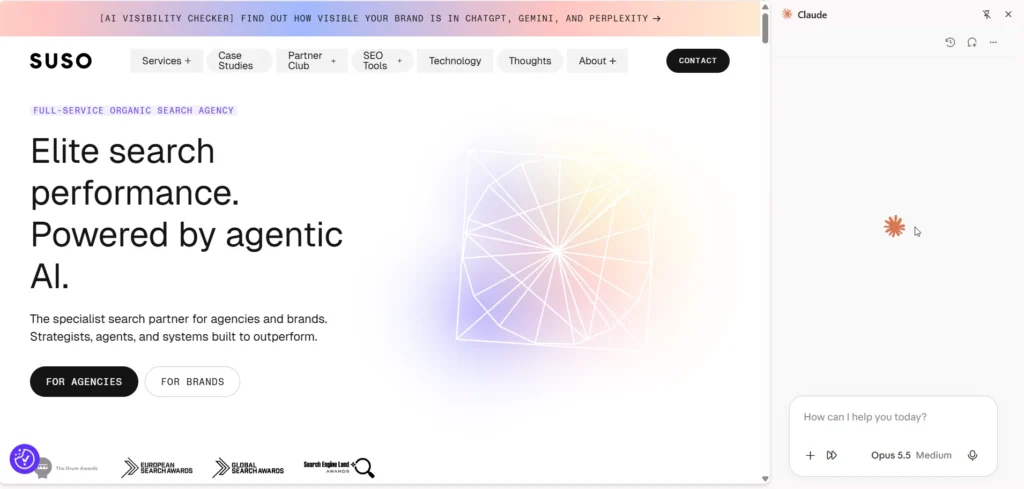
The SEO value of these AI-powered SEO agents is that they operate inside the account you already have open, on the pages you already have access to. On the reading side, that covers page text, the DOM, console output, network requests and errors, and screenshots of what is rendered.
On the acting side, it clicks, types, fills forms and, in the classic side panel, learns a workflow you record yourself. It saves recurring prompts as shortcuts you call with a slash, much like Claude Skills, and it can also run on a schedule, so a weekly check of five competitor pricing pages becomes one saved shortcut.
Claude in Chrome’s Three Permission Modes
Claude in Chrome has three permission modes, and the choice matters more than any prompt.
- Manually approve asks before each action and, in the classic side panel, first proposes a plan of the sites and steps for you to sign off.
- Automatically approve, the default in the side panel, lets Claude act while it reviews each step and blocks ones it judges unsafe.
- Skip all approvals lets it act without asking.
On client or company sites, switch to Manually approve. It’s the safest setting for protecting client and company data, and we explain why in more detail in the rules section below.
This guide covers Claude’s extension, but it is not the only option. ChatGPT now ships an official Chrome extension too, with similar page-aware behaviour.
A quick point of precision on what counts as an extension, though: Perplexity’s Comet, Google’s Gemini in Chrome and Copilot in Microsoft Edge are not extensions. Comet is a standalone browser built on Chromium with Perplexity’s own assistant built in. It runs most Chrome Web Store extensions, but Anthropic only supports Claude in Chrome in Google Chrome itself, so it isn’t available to Comet, Edge or Brave users. Gemini and Copilot are built straight into Chrome and Edge. The rules here apply to any of them, but “agentic browser extension” means the kind you add to Chrome, like Claude’s and ChatGPT’s.
These agentic tools work alongside the classic single-purpose SEO extensions, not instead of them. For the Detailed SEO Extension, Wappalyzer, Ahrefs SEO Toolbar and the rest of that toolkit, Best Chrome Extensions for SEO has the full list and is definitely worth a read.
Browser Agents vs Crawlers and SEO Platforms: Which Job Needs Which?
You might say that everything comes back to scale. It works through pages in the browser rather than crawling a site, so analysing one competitor’s pricing page live, with screenshots and a note on what their sticky CTA bar is doing, is where an AI SEO agent earns its stripes. The table below shows where it slots in against the tools you already run.
| Task | Agentic browser extension | Screaming Frog and Semrush (on their own or via MCP) |
|---|---|---|
| A set of live pages, checked visually with screenshots | Built for it | Heavier than needed |
| Site-wide crawl of 5,000+ URLs | Not the tool | Built for it |
| Keyword and backlink databases | No | Yes |
| Acting on a live page: clicks, forms, QA | Yes | No |
| Multi-source data work at scale | No | Yes, via MCP |
In a sense, the relationship is complementary rather than competitive. You should probably favour your existing tools for bulk crawling and keyword data, and on connected workflows that pull from several data sources at once. Our MCP for SEO field report describes that in more detail.
As with any AI tool, every output needs checking before it reaches a client or goes live, as the rules below explain.
How Can Different SEO Teams Use Claude in Chrome?
The use cases below come from live internal testing, one or two per team, and apply whether that team sits in-house or at an agency. We chose these examples because they hold up in real-world terms, rather than in theory.
Technical SEO: Live Audits and On-Page Checks
The live AI Overview audit is where most SEO teams can begin, by running a batch of target prompts through Google, checking which pages get cited, and comparing against the competitor pages that are showing up instead of yours or your client’s.
Try to keep the batches small, maybe around five at a time, since the agent gets reliably further with a tight set than being overloaded.
Need a More Thorough AI Visibility Check?
SUSO’s free AI Search Visibility Checker scores your brand across ChatGPT, Gemini and Perplexity on 100+ signals, from how often AI answers mention you to whether AI bots can access your site, and emails you the report in a few minutes.
Try SUSO’s AI Visibility CheckerBeyond AI Overview audits, it handles rendered-versus-raw HTML checks, console and network error spotting, and structured data work: read the markup, check it against the page content, and draft corrected code for a developer. For tab-group spot checks, it runs through canonicals, hreflang and similar across every open tab.
Content: Checking What’s Actually Winning in AI Overviews
For content teams, a perfect use case is opening the SERP and AI Overview for a specific target keyword and reading them directly before anyone writes a brief, to see what format is actually ranking and getting cited. From there, check whether your page, or a client’s, is cited in AI Overviews, and if not, which competitor pages took the slot instead.
It can also handle content brief compliance QA. Just point it at a draft and have it check internal linking, confirm the direct answer appears above the fold, and flag whether an FAQ block is present, letting a writer sanity-check a page quickly.
Digital PR: Verifying Placements and Finding Contacts Fast
Placement QA on a live link is the obvious one here, as the agent can confirm on the live page whether the link is actually there, whether it is dofollow, what anchor text it uses and whether the page carries a noindex tag, rather than taking any of it on trust from a spreadsheet.
The second use is contact discovery across a tab group. Open several prospect sites at once and have the agent compile the work contact details each site lists straight into a spreadsheet or doc you already have open in another tab, writing what it finds directly into those documents.
Be aware that one word of caution applies here: the agent finds the contacts, and you verify them before anyone uses them. Named contact details count as personal data under GDPR even when they’re published, so the list needs the same data protection handling as any other contact data you hold.
Account Managers, Marketing Leads and Everyone Else
This is where the tool really proves its worth for people who do not live in SEO tooling all day. On a client or stakeholder call, for example, you can run a fast competitive or on-page check while they are on the line, and when a client or colleague shares a dashboard, the agent can pull the relevant numbers into a quick summary without you building a report from scratch.
For any recurring task, just save the prompt as a shortcut once instead of rewriting it, then call it with a slash after that.
Usage and Token Costs of Claude in Chrome
Everything above works well with an AI browser agent, but each page it handles uses tokens. To see a page, it takes screenshots, and in Anthropic’s guidance for browser and computer use, each screenshot uses roughly 1,000–1,800 tokens. On a paid plan, browser sessions count towards the same usage limit as Claude chat, Cowork and Claude Code, and Anthropic lists browsing websites among the tasks that use it up. Through the API, the same work is billed per token.
So it pays to match the tool to the job. When you only need to read a page, web search or web fetch is lighter. When the data sits in a tool with an API or connector, an MCP connection or API call returns it as text without opening the page. Use the browser agent for what it does best: work that depends on the live, rendered page or your own logged-in session, such as the AI Overview audits and brief checks on drafts in your CMS.
What Are the Non-Negotiable Rules for AI Browser Agents on Live Sites?
This section separates a useful tool from a liability. Claude in Chrome has been generally available since August 2026, but Anthropic still recommends keeping it off sensitive sites, so it deserves the same care as any tool with your logins.
The rules below are the specific lines that keep client and company sites safe.
Keep Control of Every Action
In keeping with our position on having human eyes view actions, we suggest you default to Manually approve, not Automatically approve or Skip all approvals, on anything client-facing or live. Read what the agent proposes, then approve it before it goes anywhere near a live page. This single, important habit is worth being strict on, as it gives you control over every action before it happens rather than after.
Name the tabs or URLs explicitly in your prompt, state the output format you want, and ask the agent what it could not verify. A clear instruction up front saves a flawed result later.
Do not ask it to send, publish or submit anything on a client or company site. Review the output and send it yourself. Remember that a wrong click is still a real click.
Keep Sensitive Data Out of the Agent’s View
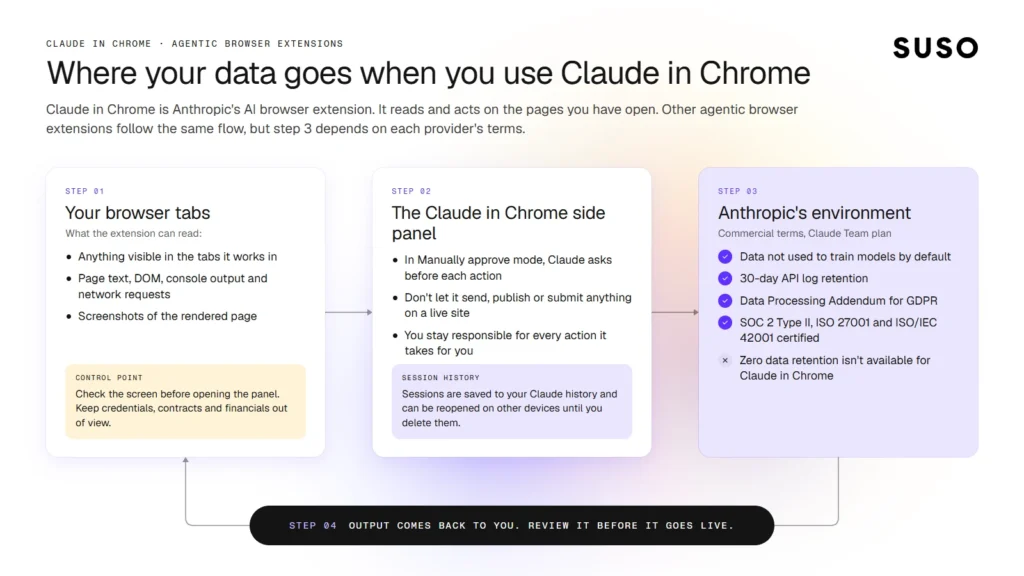
Keep credentials, contracts and financial data out of its view entirely. If your own or a client’s WordPress dashboard is open, remember the agent has exactly the access you do, and it will act on that access if you ask it to.
By the same token, that principle cuts both ways: the power that makes it useful is the same power that makes an unsupervised action on a live client or company site a real risk.
Also, do not open the panel over a confidential screen. Whatever is visible in the tabs it works in, confidential figures included, is captured in screenshots and becomes part of the conversation.
One practical note: side panel sessions are saved to your Claude history and can be reopened on other devices, so anything captured in a session stays there until you delete it.
Last, and arguably most important, you remain responsible for every action the agent takes, because you were the one who asked for it. That responsibility does not transfer to the tool.
How Does Claude in Chrome Handle Client and Company Data?
It is fair to ask where client data goes when it passes through one of these extensions. The extension runs inside the same commercial environment as the rest of SUSO’s Claude use, not as a separate, less-governed tool.
SUSO operates on Claude’s Team plan, and under those commercial terms, client data is not used to train models, API log retention is 30 days, and a GDPR-compliant Data Processing Agreement governs the relationship. Claude in Chrome runs under the same Team account, with one difference: its sessions are kept in your Claude history, and Anthropic’s zero-data-retention option doesn’t cover it.
What the extension actually sees is whatever is visible in the tabs it works in when the panel is open, screenshots included, and that is the real control point. The person driving it chooses what is on screen, which is why the “no credentials, no confidential screens” rule carries more weight here than with other AI tools, which only see what you paste in or connect them to.
Anthropic holds SOC 2 Type II, ISO 27001 and ISO/IEC 42001 certifications, which cover how it manages security and AI risk on its side. What reaches the extension in the first place is still up to the person using it, so treat data governance as an ongoing habit rather than a setting you configure once:
- Check what is on screen before opening the panel.
- Default to Manually approve.
- Approach every session as something a client or your own compliance team could one day audit.
Where Browser Extensions Stop and Connected Agentic Workflows Take Over
A browser extension works inside the browser. It sees what is in your tabs, acts on it and hands the result back to you. That covers a lot of day-to-day SEO checking, but the work that moves rankings and AI visibility depends on data no browser tab shows.
Take a GEO audit. Finding out why a brand isn’t cited in AI answers means joining tracked prompts, AI Overview triggers, Search Console queries, backlink data and GA4 referral sessions, then deciding what to fix first. No side panel holds all of that at once. It needs AI agents connected to those data sources through MCP (Model Context Protocol, the open standard that lets an AI model query tools like Semrush, Screaming Frog or GA4 directly), plus specialists who decide what to ask and check what comes back.
That connected setup is how SUSO delivers SEO and GEO work today. Our MCP field report shows a few of these workflows in production, with Claude connected to tools such as Semrush, Screaming Frog, Otterly.AI, Majestic and Windsor.ai for tasks including off-site audits, keyword research, content planning and GEO audits.
On one GEO campaign, query fan-out (how an AI engine breaks a prompt into related searches) turned 56 tracked prompts into 671 ways a buyer might phrase the same questions. Done by hand, checking every variant against live keyword data would take hours, which is why that check is easy to skip. The connected workflow ran it in a single session and showed that fewer than 1% of the variants had measurable search volume, which stopped us from reporting demand that wasn’t there.
For any team, in-house or agency, browser extensions work best alongside connected workflows, handling the quick, simple checks on live pages. The connected, multi-source layer is where the build, the testing and the expert review start to decide the result.
Common Mistakes to Avoid With Browser Agents
A short list of the ways this goes wrong in practice:
- Using it as a substitute for a proper site-wide crawl.
- Leaving it on Automatically approve or Skip all approvals for work on live client or company sites.
- Having it open on a page showing client financials, credentials or contracts.
- Sending agent output to a client without reviewing it first.
- Forgetting that what it sees is captured in screenshots, so confidential information becomes part of a saved conversation rather than a passing glance.
Where AI Browser Agents Fit in an SEO Workflow
Agentic browser extensions are a real addition to any SEO or marketing team’s toolkit for live, on-screen work, with proper guardrails around client and company data. But they are one part of the SEO toolkit, not all of it: they won’t crawl a site, join up your data sources or replace a specialist’s judgement, and they aren’t meant to.
That bigger, multi-source work is where SUSO comes in. We run SEO and GEO agentic-first, with AI agents connected to the data and specialists directing and checking every step, and both our clients and agency partners get the benefit. Speed is a given with AI now. What matters is what that speed makes possible: checking full query sets and whole sites where a manual review would take a sample, and reading search, AI visibility and backlink data together instead of one tool at a time. That means the work you pay for goes further and delivers more value.
See What a Deeper SEO Audit Finds
SUSO’s SEO audits cover technical health, content and backlinks, plus how your brand shows up in AI answers from tools like ChatGPT and Gemini, and end with a prioritised roadmap. Available direct or white label for agency partners.
Request an Audit
FAQs
-
What is an agentic browser extension?
An agentic browser extension is an AI side panel that reads and acts on the live web page you are already viewing, rather than only answering questions about it. It can access pages behind your login, work across multiple open tabs, and take actions like clicking, filling forms and compiling data, all within the browser you already use.
-
What other agentic browser extensions exist besides Claude in Chrome?
ChatGPT’s official Chrome extension is the closest equivalent, with similar page-aware and agentic capabilities. Perplexity’s Comet, Google’s Gemini in Chrome and Copilot in Microsoft Edge are not extensions: Comet is a standalone Chromium browser with Perplexity’s own assistant built in, and the other two are built into Chrome and Edge. Claude in Chrome only runs in Google Chrome, so it isn’t an option inside Comet or Edge.
Whichever one you use, the same guardrails apply: keep credentials, contracts and financial data off screen while the panel is open, have the agent ask before each action on client or company sites, and review its output before it reaches a client or goes live. The rules section above covers them in full.
-
Do I still need MCP connectors if I’m already using Claude in Chrome?
Yes, for anything structured or run at scale, at least. An agentic browser extension handles live, on-screen tasks in the browser that you review as they happen. MCP-powered automations handle multi-source work across many pages at once. They cover different jobs, you can see examples in SUSO’s MCP field report. Setting those workflows up, keeping them accurate and checking their output is specialist work, which is why SUSO runs them as part of delivery.
-
Can a browser extension like Claude in Chrome replace Screaming Frog for site crawls?
No. An agentic browser extension works through pages one by one in the browser, so it isn’t built to crawl a whole site. Use a crawler such as Screaming Frog for that, and an SEO platform such as Semrush or Ahrefs for keyword and backlink data, since the extension has no database of its own.
-
Is Claude in Chrome safe to use for SEO on client and company websites?
Yes, albeit with clear rules: no sensitive data ever visible to it, such as credentials or financial data, Manually approve mode for anything client-facing, and no unsupervised sending or publishing. The rules section above covers the rest, from keeping sensitive data out of the agent’s view to keeping control of every action.
-
What are the best Chrome extensions for SEO?
It depends on the job. Agentic browser extensions such as Claude in Chrome and ChatGPT’s browser extension read and act on the page you have open, which suits live checks and multi-step tasks. Single-purpose SEO extensions handle specific checks faster: the Detailed SEO Extension for on-page audits, Robots Exclusion Checker for indexing problems and Web Developer for rendering checks. Our guide to the best Chrome extensions for SEO and AI search covers the full list.