Find out how to construct an eCommerce website that is great for users and accessible for search engines.
Running a local shop means competing with a few stores down the street. But SEO for e-commerce websites puts you in the ring with millions of online sellers worldwide. In this digital marketplace, success requires more than just listing products—it takes smart search engine optimization.
Constructing an e-commerce website with SEO in mind from the very start is one of the smartest moves you can make. A well-constructed online shop does double duty. Shoppers find exactly what they’re looking for, while search engines reward you with better rankings.
This guide outlines the essentials needed to create an SEO-optimized online store and advanced techniques for outperforming your competition.
What You’ll Learn In This Guide
- How to choose the right e-commerce platform for SEO
- The four essential page templates every store needs
- Ways to structure your store for better search rankings
- Tips for writing product descriptions that rank
- How to build a strong internal linking system
- Advanced SEO techniques for growing stores
- Using AI to improve your store’s SEO
Choosing Your E-commerce Platform
Your choice of e-commerce platform affects how well you can optimize your store. Each platform has different SEO features—some make optimization easy, while others require more work but offer more control.
| Platform | Pros | Cons | SEO Friendliness |
|---|---|---|---|
| Shopify | ✓ User-friendly interface ✓ Large app ecosystem ✓ Hosted solution (no server setup) | ✗ Monthly fees + transaction fees in some plans ✗ Limited flexibility without advanced coding | – Decent on-page SEO tools – Limited URL structure customization |
| WooCommerce (WordPress) | ✓ Free plugin (but hosting costs vary) ✓ Highly customizable ✓ Large developer community | ✗ Requires WordPress knowledge ✗ May need multiple plugins for advanced features | – Very SEO-friendly (WordPress core + SEO plugins) – Can be as optimized as you want with the right setup |
| BigCommerce | ✓ Built-in SEO tools ✓ Flexible product options ✓ Good multi-channel integration | ✗ Monthly subscription cost ✗ Fewer theme options | – Good URL customization – Supports bulk editing of metadata |
| Magento | ✓ Highly scalable for large stores ✓ Extremely flexible and customizable | ✗ Complex to set up (developers often needed) ✗ Can be costly to host and maintain | – Excellent for large catalogs if optimized correctly – Requires more technical know-how for best results |
Choose your platform based on:
- Your technical expertise
- Business size and growth plans
- Budget for additional apps/plugins
- Need for customization
Essential E-commerce Website Architecture
Once you’ve chosen your preferred platform, building a search-engine-friendly e-commerce site starts with getting the fundamental structure right. Good structure helps customers find and buy products easily, while poor structure frustrates them and hurts your search rankings.
The Four Main Templates
Every e-commerce site needs four types of pages to rank well and convert visitors. Each serves a specific purpose in guiding customers toward a purchase.
Homepage
What Is It?
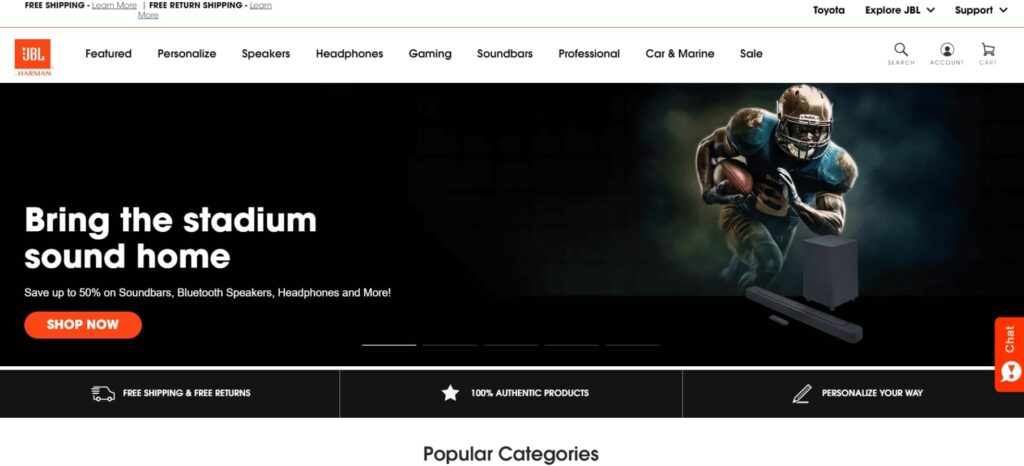
Your homepage is your digital storefront – the first impression for many visitors and often your strongest page for search rankings. It sets the tone for your brand and helps visitors quickly find what they’re looking for.
What Should It Be Used For?
A well-optimized homepage should:
- Showcase your best-selling products and latest promotions
- Help visitors quickly understand your product range
- Provide clear navigation paths to category and product pages
- Build trust through prominent reviews and security badges
An example of an e-commerce homepage:
Category Listing Pages (CLPs)
What Are They?
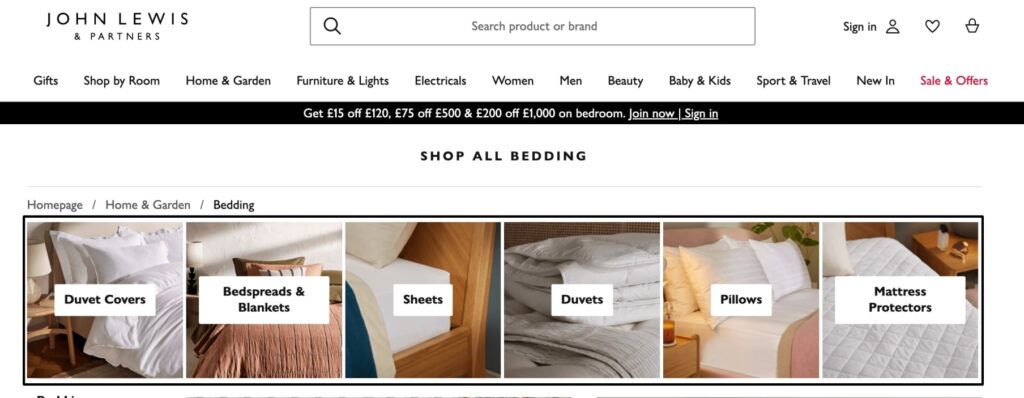
Category listing pages organize your broad product ranges. If you’re running a clothing store, these would be pages like “Men’s,” “Women’s,” or “Kids.” They’re essential for both navigation and SEO, acting as hubs that connect to more specific product categories.
What Should They Be Used For?
Your CLPs need to:
- Organize products into clear, logical groups
- Use category-level keywords naturally in titles and descriptions
- Link to subcategories with descriptive anchor text
- Include relevant filters that help customers narrow their search
- Maintain a clean, hierarchical URL structure for better SEO
Category listing page example:
Product Listing Pages (PLPs)
What Are They?
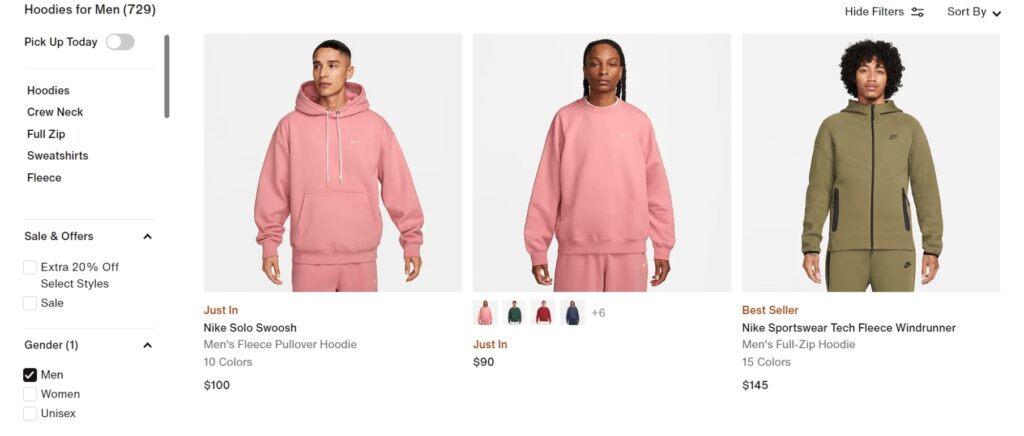
PLPs are the templates most commonly associated with subcategories. They’re vital for middle-funnel SEO terms where users have a more specific intent, like “men’s running shoes” or “organic cotton bedding.” These pages can include promotional spaces while maintaining strong SEO value.
What Should They Be Used For?
Strong PLPs should:
- Promote product discovery through clear hierarchy and navigation
- Use proper technical SEO for filters and sorting options
- Implement SEO-friendly pagination or infinite scroll
- Include unique category descriptions that target relevant keywords
- Build internal link equity through related category links
- Rich with metadata linking back to parent categories
An example PLP:
Product Detail Pages (PDPs)
What Are They?
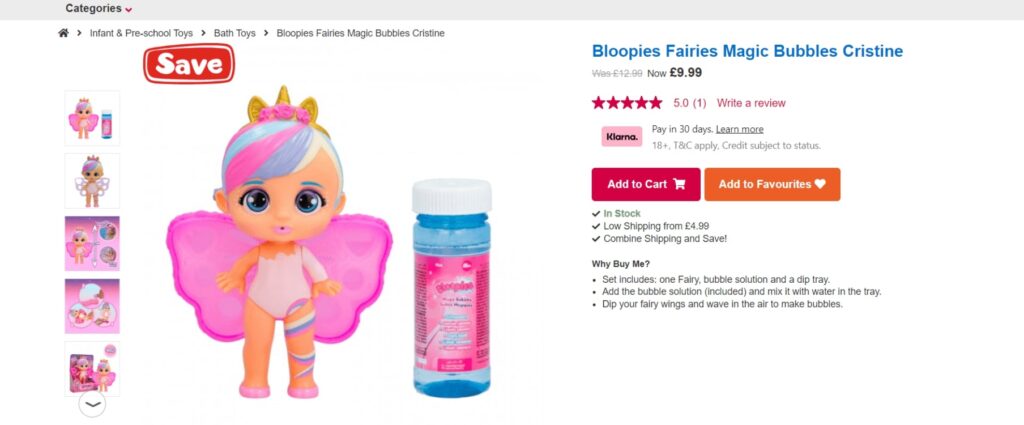
PDPs are your conversion pages, representing the final stage before purchase. They need to satisfy both detailed search queries and user buying intent. These pages often rank for long-tail keywords and specific product searches.
What Should They Be Used For?
Effective PDPs must:
- Present unique, keyword-rich product descriptions that avoid manufacturer duplicates
- Implement structured data markup for rich snippets in search results
- Include optimized image alt tags and filenames
- Display customer reviews that generate fresh, unique content
- Feature clear shipping details and stock status for search engines
- Use internal linking to related products and categories
- Include schema markup for prices, reviews, and product details
An example PDP:
If you’re looking for an in-depth guide on crafting descriptions that not only rank but also drive sales, check out our article How to Write Product Descriptions That Sell.
Five Core SEO Elements for E-commerce Success
Modern search engines look at hundreds of signals when deciding where to rank your products. We’ve identified five core elements that consistently separate high-ranking e-commerce sites from those stuck on page two or worse.
These elements work together to create a site that users and search engines trust.
1. Strategic Keyword Research

Keyword research reveals how your customers search for products online. Good keyword targeting helps search engines understand exactly what you’re selling and shows your products to the right customers at the right time.
Types of Keywords That Drive Sales
Effective e-commerce keyword research targets three main types of searches:
- Category-level terms like “men’s watches” or “organic skincare” capture browsers early in their buying journey
- Product-specific searches such as “Seiko SKX007” or “vitamin C serum” show clear buying intent and often convert well
- Long-tail variations, including “waterproof dress watches under $200” might have a lower search volume but typically convert better due to their specificity.
Research Process
Many e-commerce sites start keyword research with Google’s free Keyword Planner. But if you’re serious about SEO, tools like Ahrefs or SEMrush are worth the investment. They’ll show you keyword difficulty scores, give you better search volume data, and help spot ranking opportunities.
Take a good look at your competitors’ rankings. When you spot lower-quality sites ranking well for valuable terms, that’s a clear sign of opportunity. Sometimes, the easiest wins come from seeing what’s already working for others in your market.
Your own site holds valuable keyword data too. Read through customer reviews and Q&A sections – customers write exactly how they think about your products. When you see the same phrases or questions pop up repeatedly, you’ve found solid keywords to target.
Don’t forget to dig into Google’s search results themselves. The questions in the “People Also Ask” boxes and related searches at the bottom of the page show you what Google connects to your main keywords. Use these to expand your keyword lists and spot trends in how people search.
Strategic Keyword Mapping
Once you have a solid list of keywords, it’s time to map them to specific pages on your site based on search intent:
- Homepage: Target broad, brand-focused terms and top-level category keywords
- Category pages: Use broader product category keywords that match how people shop
- Product pages: Focus on specific product names, models, and key features
- Content pages: Target informational queries that support the buying journey
Review your keyword strategy quarterly. Customer language evolves, new products launch and search trends change. Use your analytics data and search console reports to spot these changes and adjust your targeting accordingly.
Next up, we’ll look at how to implement these keywords with the right technical foundation.
2. Technical Foundation
Technical SEO might sound complicated, but every successful e-commerce site starts with four basic elements: clean URLs, mobile-friendly pages, fast loading times, and solid security. Get these right, and you’ll have a strong foundation for more advanced optimization later.
URL Structure and Site Architecture
Clean URLs help both customers and search engines understand your site structure. Keep them short and descriptive:
✓ Good: example.com/mens/shoes/running
✗ Bad: example.com/cat_id=45&subcat=89
Your site architecture should follow a logical hierarchy:
- Homepage
- Main categories
- Subcategories
- Product pages
Each level should link properly to those above and below it. This helps search engines understand the relationships between your pages and products.
Mobile-First Approach
Mobile optimization isn’t optional anymore. Your site needs to work smoothly on phones and tablets, with easy-to-use navigation and quick-loading product images. Pay special attention to:
- Touch-friendly buttons and menus
- Visible and usable search functions
- Easy-to-read product information
- Simple checkout process
- Properly sized images across devices
Speed Optimization
Page speed affects both rankings and sales. No one wants to wait for product images to load or deal with a sluggish checkout process.
You can check your site speed using:
Focus on these basic speed improvements:
Product Images:
- Make images smaller without losing quality
- Don’t use images larger than needed
- Load images only when customers scroll to them
- Consider tools like TinyPNG or ShortPixel for easy compression
Hosting and Performance:
- Choose good quality hosting – cheap hosting often means slow sites
- Remove plugins or apps you don’t need
- Keep your platform (like Shopify or WooCommerce) updated
Common Speed Issues:
- Large, uncompressed images
- Too many apps or plugins
- Poor quality hosting
- Outdated software
Check your speed monthly, especially after making major changes to your site. Pay attention to mobile speed – most customers shop on their phones.
Basic Site Security
Every e-commerce site needs solid security – not just for your customers’ safety but also because Google prefers secure sites. Start with these essentials:
Your site needs solid security to protect customers and maintain Google’s trust. Start with HTTPS—your site should always show the padlock icon in browsers. This tells visitors their data is safe, especially during checkout. These days most modern e-commerce platforms already enforce this.
Display recognized security badges to show customers they can trust your site. PayPal Verified, Norton Secured, and SSL certificate badges help build confidence, especially for first-time visitors. Your payment provider’s trust badges also reassure customers their transactions are secure.
Place these badges where customers look for trust signals – your homepage, product pages, and especially your checkout pages. Many sites also include them in the footer so they appear across the whole site.
Security badges only work if they’re genuine – fake badges can get your site penalized.
3. Content Strategy for E-commerce

Content makes the difference between a basic product listing and a page that sells. Good e-commerce content answers customer questions, targets the right keywords, and helps search engines understand exactly what you’re selling.
Product Descriptions
Every product needs its own unique description – copying manufacturers’ text isn’t enough. Take their basic specs and features, then add your own expertise about how the product helps customers. What problems does it solve? Why should someone buy it? Use your target keywords naturally and answer the questions customers ask most often.
Category Content
Don’t leave your category pages bare. Each one needs a solid introduction that helps both customers and search engines. Explain what products customers will find, highlight your best sellers, and include relevant keywords. Think about what someone searching for “men’s running shoes” or “organic skincare” wants to know when they land on your page.
Buying Guides
Help customers make good buying decisions with clear, helpful guides. Break down the different types of products you sell, explain key features, and guide people toward the right choice for their needs. These guides not only help customers—they also bring in search traffic from people researching before they buy.
Blog Content
Set up your blog to support your products, not just fill space. Write about problems your products solve or topics your customers care about. If you sell garden tools, write about gardening. Selling sports gear? Cover training tips and equipment guides. Just make sure every post naturally connects to the products you sell.
User-Generated Content
Set up your site to make the most of customer content. Add a good review system, enable product Q&As, and create spaces for customers to share photos with your products. Make it easy for happy customers to leave reviews – this fresh content helps both new shoppers and search engines understand your products better.
4. Your Site’s Link Structure
Your internal links guide both customers and search engines through your store. Good internal linking helps search engines understand which pages matter most and helps customers find related products they might want to buy.
Category to Product Links
Think carefully about how you link from category pages to products. Use descriptive text in your links that includes the main product features or benefits, not just “Click here” or “Buy now.” Keep your category pages well-organized with clear sections for different product types.
Related Products
Set up your product pages to show genuinely related items. Don’t just display random products from the same category – show items that work together or offer alternative options. If someone’s looking at running shoes, show them running socks and insoles, not casual sandals.
Navigation Structure
Build your main navigation menu to reflect how customers actually shop. Put your most important categories first and group similar items together. Keep it clean and simple – too many options confuse both customers and search engines.
Breadcrumb Navigation
Add clear breadcrumb trails to every page. They should show exactly where customers are in your store: Home > Men’s > Shoes > Running Shoes. Make sure they’re clickable links, not just text, and use consistent category names throughout your site.
Cross-Selling Links
Create natural links between related content. If you have a blog post about choosing running shoes, link it to relevant product categories. If you’re selling a coffee maker, link to coffee beans and filters. These connections help customers find what they need while strengthening your site’s overall SEO structure.
5. On-Page Optimization Essentials

Good on-page SEO turns basic product pages into pages that rank. Each element needs to work together to show search engines exactly what you’re selling and why your pages deserve to rank.
Title Tags and Meta Descriptions
Write unique titles for every product and category page. Include your main keyword naturally and add key selling points that make customers want to click. Meta descriptions should highlight benefits and features that set your products apart from competitors.
Product Image Optimization
Name your product images properly before uploading them. Use descriptive file names and add relevant alt text that helps both search engines and visually impaired customers understand what’s in the image.
Don’t just use “red-dress.jpg”
Try “womens-silk-maxi-dress-red-front-view.jpg.”
Headers and Content Structure
Use header tags (H1, H2, H3) to organize your content logically. Your H1 should be unique for each page and include your main keyword. Use subheaders to break up product features, specifications, and descriptions in a way that’s easy to scan.
URL Optimization
Keep your URLs clean and descriptive. Include relevant keywords but keep them short. Use hyphens between words and avoid unnecessary numbers or characters. Make sure your URL structure matches your site’s category hierarchy.
Product Information
Put important product details where both customers and search engines can easily find them. Include:
- Price
- Availability
- Delivery options
- Size/color variations
- Key specifications
Advanced E-commerce SEO Techniques

Once you’ve got the basics of constructing your SEO-friendly store, these more advanced techniques can help refine your optimization. They build on the fundamental structure we’ve covered and add extra signals that search engines value.
Schema Markup for Better Results
Schema markup sounds complex, but essentially it’s just labels for your products. Schema helps search engines show better results with prices, ratings, and availability right in the search results.
Here’s what to mark up on different pages:
- Product pages: Add prices, stock levels, and ratings
- Category pages: Show how many products you stock
- Reviews: Help good reviews appear in search results
- Company info: Add your contact details and locations
Most e-commerce platforms include basic schema. Plugins like Yoast SEO or Rank Math can add more. Just check Google’s Rich Results Test to make sure it’s working properly.
Video Schema: If you have product explainer videos, add video schema to give yourself a chance of appearing in video-rich results.
Managing Faceted Navigation
When customers filter your products by size, color, or price, each combination creates a new URL. This can cause problems:
- Your site has too many pages for Google to handle
- The same products appear on multiple URLs
- Search engines waste time on filter combinations that no one uses
Here’s how to fix it:
- Keep filtered URLs clean (example.com/shoes/size-10 instead of ?filter=size&value=10)
- Block filter combinations that aren’t useful
- Only allow search engines to see your main category and filter pages
Managing Out-of-Stock Products
Out-of-stock products need careful handling. Deleting these pages throws away valuable SEO rankings you’ve built up over time. Instead, keep the pages live, mark them as out of stock in your code, and use the opportunity to show customers similar products they might like. Adding a “back in stock” notification system helps capture sales from interested customers.
Handling Seasonal Products
Seasonal products present a similar challenge. Rather than removing these pages when items go out of season, keep them live with updated content explaining when products will return. This preserves your SEO value year-round and helps customers plan future purchases. Maintain your internal links to these pages – removing them can hurt your site structure.
Site Search Optimization
Check what customers type into your site’s search box – it often reveals valuable SEO opportunities. When you spot common searches that return poor results or no results at all, you’ve found gaps in your SEO strategy. These might be:
- Missing product descriptions
- Keywords you haven’t targeted
- Categories customers want, but you haven’t created
- Different ways of describing your products
Building Trust Signals for Better Rankings
Google looks closely at expertise, authority, and trust (E-A-T) when ranking e-commerce sites. This matters even more for stores selling products that impact users’ health, wealth, or safety.
Expertise
Your store needs to demonstrate deep knowledge of its products and industry. Add detailed specifications, create comprehensive buying guides, and share insider tips about product features and uses. Having content written or reviewed by industry experts helps, especially for technical products or items affecting customer health and safety.
Authority
Establish your site as a reliable source in your market. Display relevant certifications, link to recognized manufacturers, and highlight any industry awards or recognition. Professional partnerships and accreditations show Google and customers that established names in your field trust you.
Trustworthiness
Trust comes from how you handle customers and their data. Clear shipping and return policies, secure payment processing, and genuine customer reviews all matter. Make your contact details easy to find and respond promptly to customer questions – Google notices these trust signals.
This is just an overview of E-A-T. For the full picture, see our guide to E-A-T optimization for e-commerce websites.
AI-Powered SEO for Online Stores

AI is transforming e-commerce SEO at a remarkable pace, and we’re only seeing the beginning. What started with basic automation has evolved into sophisticated tools that can analyze data, spot patterns, and make smart recommendations in ways humans simply can’t match.
The speed of AI development in e-commerce is staggering. Tasks that used to take weeks – like optimizing product descriptions across an entire catalog or analyzing competitor strategies – can now be done in hours. More importantly, AI tools are getting better at understanding search intent, customer behavior, and the subtle signals that influence rankings.
E-commerce platforms now have AI built directly into their systems. Take Shopify—its Magic tool creates SEO-friendly product descriptions, optimizes metadata, and even suggests FAQs to help with search rankings. Sidekick acts as a digital assistant, analyzing how your store performs and offering concrete suggestions for improvement.
With new AI tools launching almost daily, it’s easy to get overwhelmed. Rather than listing every option out there (they’ll probably be outdated by next week anyway), here are a few of the ways AI helps with SEO:
Product Descriptions: Instead of copying manufacturer descriptions (a common SEO problem), AI can help create unique ones that naturally include your target keywords.
Meta Data Creation: Writing title tags and meta descriptions for hundreds of products is tedious. AI can suggest ones that are more likely to get clicks from search results.
Content Gap Analysis: AI spots what your competitors are ranking for and shows you topics you might have missed.
Technical SEO: Rather than manually checking for problems like broken links or missing alt tags, AI can find these issues quickly and suggest how to fix them.
Interested in learning more? Our complete guide on The Impact of AI on E-commerce SEO explores these topics in detail.
Final Thoughts on Building Your Store
Building an SEO-friendly online store takes work, but get it right, and you’ll see the rewards in better rankings and more sales. We’ve covered the essential building blocks, from choosing your platform to advanced optimization techniques. Each part works together to create a store that both customers and search engines understand.
SEO for e-commerce is ever-changing. What worked last year might not be enough today, especially with AI changing how we optimize stores. Keep learning, testing new approaches, and measuring what works for your store.
While many store owners start out doing most of the work themselves, getting expert help can speed up the process and avoid costly mistakes. At SUSO Digital, we help store owners turn SEO complexity into real results. Find out how we can help grow your store with our e-commerce SEO services.