
Learn how to grow your website’s authority and revive its backlink profile through link reclamation.
Developing a solid backlink profile that will make your website more visible and carry more authority is a crucial tactic in the ever-changing world of SEO. But what do you do when those well-earned backlinks start disappearing?
That’s where the art of link reclamation comes into play – a mighty link building strategy for getting back lost links and keeping your site’s SEO performance on track. In this article, you’ll learn what link reclamation is, why it’s important, and what to do to easily reclaim lost links using tools like Ahrefs, Screaming Frog, or reverse image search.
What is Link Reclamation?
Link reclamation is the process of finding and recovering broken or lost backlinks to your site. Reasons for this could be due to website migrations, changes to URLs, and the deletion of content. Once you get those links back, some value (aka link authority) will have been recovered from them for your search engine optimisation efforts, thereby maintaining or improving important keyword rankings.
Why Should You Bother Reclaiming Lost Links?
Lost link reclamation is an essential part of maintaining both the authority and search engine ranking of your website. There are a few reasons why you should care enough to engage in link reclamation.
- Preserve SEO Value: Lost backlinks may lower your website’s ranking because the equity passed by the link no longer adds any value to your SEO. Reclaim such links to retain the value they provide for your SEO.
- Drive Referral Traffic: Although not a primary SEO goal, backlinks built at high-traffic websites tend to drive referral traffic towards your website. When a link is lost, the probable traffic from that source gets destroyed. Reclaiming the link lets you retain the lost traffic.
- Cost-effective: It is much easier and less expensive to reclaim lost backlinks rather than build entirely new ones. What you are doing, in essence, is reinstating the value you have already acquired rather than building something from scratch.
What’s the Difference Between Unlinked Mentions and Link Reclamation?
Link reclamation and unlinked mentions are completely different strategies.
Link reclamation is all about reclaiming backlinks that have been lost or were once broken, pointing to your site. This will help restore lost SEO value.
We can talk about unlinked mentions when another website mentions your brand, product, or content without linking back to your website. The strategy is through outreach, asking them to convert that mention into a link.
As important as both methods are, link reclamation focuses on recuperating previously gained links, while for unlinked mentions, a new link is created by converting them into backlinks.
How to Find and Reclaim Lost Backlinks Using Ahrefs
Ahrefs is one of the most robust tools in finding lost backlinksand how to reclaim them.
Here’s how you can use it:
Check Lost Backlinks
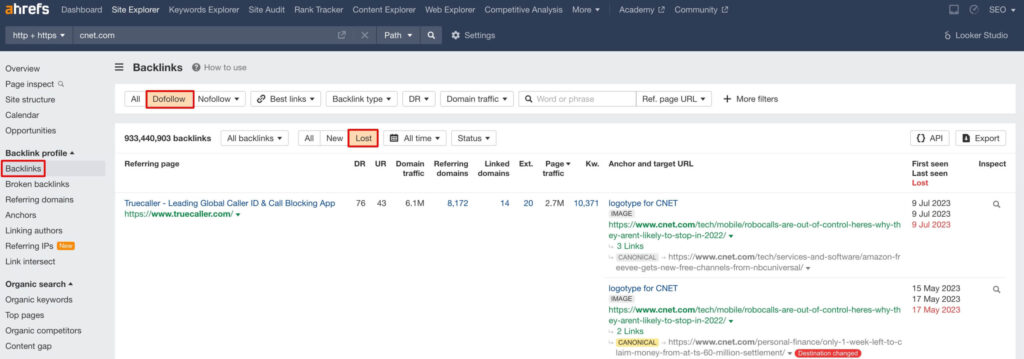
- Open Ahrefs Site Explorer.
- Insert your website URL and proceed to the “Backlinks” report.
- Click on the “Lost” filter to show the backlinks which recently disappeared.
- Select “Dofollow” backlinks only.
Analyse the Causes
Now that you have a list of all of the backlinks that you’ve lost, you need to analyse why the links were lost.
The usual reasons include a 404 error, a linking page deleted, or an anchor text removed from the linking site.
You can filter them via the Status drop down menu.
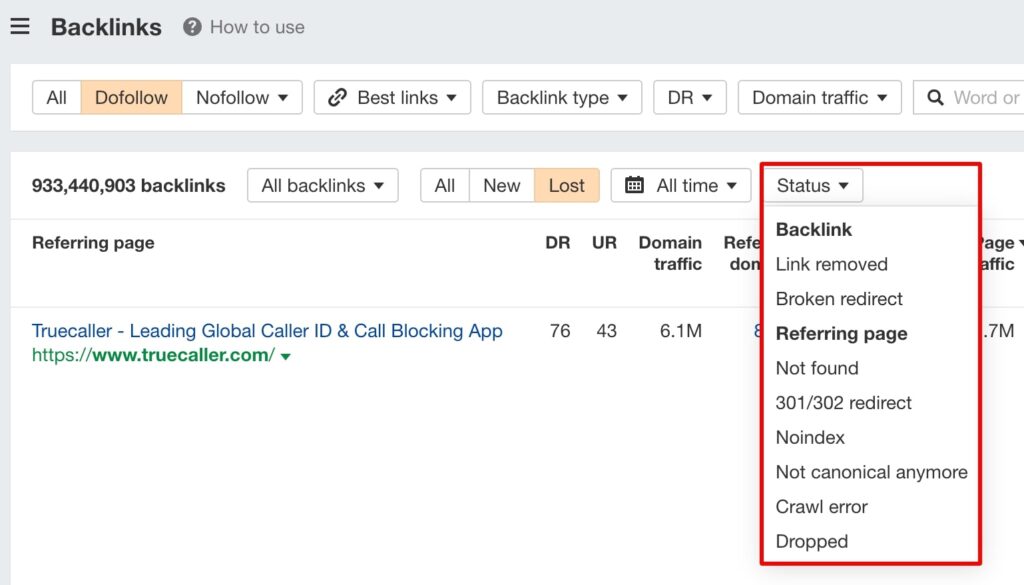
Focus on reclaiming backlinks where the link was removed, the referring page is not found or the backlink has a broken redirect.
Also pay attention to which referring pages have the highest estimated traffic. As these are the ones that are more likely to get eyes on your website once you’ve reclaimed the link.

Reach Out for Reclamation
If it’s due to a technical error, contact the website owner and request that they reinstate the link.
Share the exact URL with them or suggest a substitute replacement link on your site if the page they were linking to no longer exists.
Monitoring and Follow-up
After reaching out, the situation should be monitored. If the link is not replaced in a decent amount of time, you may want to send a gentle reminder.
Continual monitoring for and reacquiring lost backlinks helps to protect the value of your backlink profile and ensure traffic from SEO continues.
How to Find and Reclaim Broken Internal Links Using Screaming Frog
Internal linking is really important for search engines to crawl through your site, understand its architecture, and spread link equity through various pages of your site.
However, broken internal links hinder these processes.
Screaming Frog is great for discovering and resolving such issues. Here is a short manual on how to utilise this amazing tool for your SEO benefits.
Crawl Your Website
Open Screaming Frog, input your website’s URL and click on Start Crawl. It will start crawling your website for broken internal links.
Find Broken Links
After the crawl is complete, head over to the “Response Codes” tab, then filter for 404 errors.

There you have it – all your broken internal links on your site.
Fix or Redirect
For each and every broken link, find out whether the destination page actually exists.
If it does, fix the URL.
If the page is no longer available, you can implement a 301 redirect to an active related page or replace the internal link with another resource.
Fixing broken internal links enhances user experience, preserves your site’s link equity, and ensures proper indexing of pages from search engines.
How to Reclaim Lost Backlinks Using Reverse Image Search
Images get passed around the internet, and every now and then, your visuals will appear where they shouldn’t, without giving you proper credit. Reclaiming those lost image backlinks is another great link reclamation tactic.
Reverse Image Search
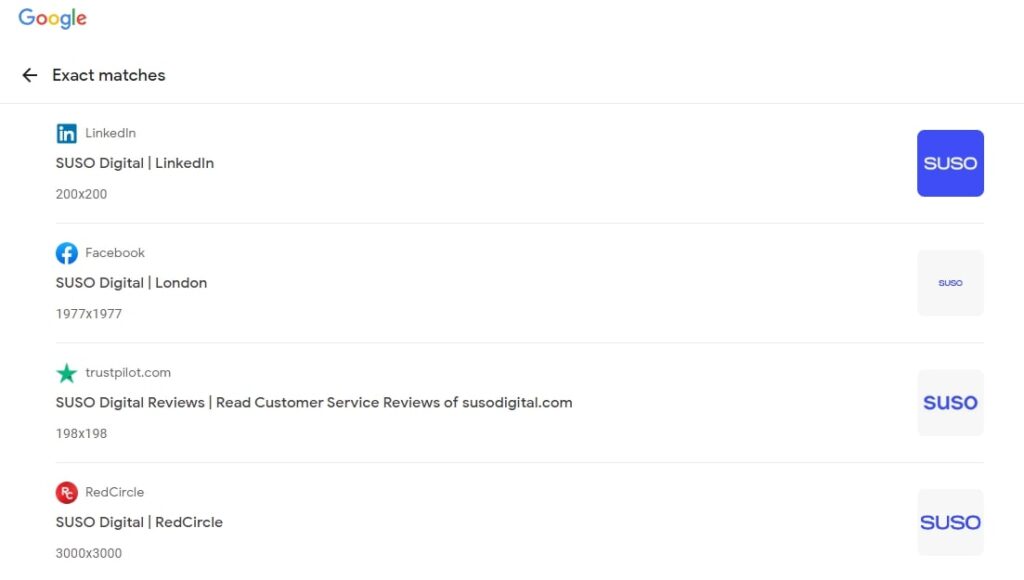
Use tools such as Google Reverse Image Search or TinEye to search for instances of your images being used online without a backlink.
Reach Out for Attribution
Contact the webmasters of sites using your image and request that they give a credit link back to your site.
Provide them with the exact URL of the location where the image lives on your site to make it really easy for them to add the correct link.
Remember all the different requests you’ve made and follow up where necessary. This can be surprisingly effective in reaping the rewards in image reclamation of links.
The Bottom Line
Link reclamation is one of the most effective SEO strategies you could undertake because it really helps you regain lost value and maintain your site’s authority. Run regular checks for lost backlinks, broken internal links, and uncredited images so your site keeps pulling in that link equity.
Make this process seamless with Ahrefs, Screaming Frog, and reverse image search, and don’t forget the follow-up outreach. Make the best out of the tools available and make sure you cover all your bases when executing an excellent SEO strategy.